As a reference to my post Crack/hack any windows XP password, where i have explained a hack to crack any windows XP password, this is small but very useful XP hacking tutorial which is emphasized on the method used to change/hack Windows XP administrator password if you don`t have access to admin account(student account).
Just follow the steps given below.
Steps:
1. Start-->Run-->lusrmgr.msc and press Enter or OK.
2. Than there`s two folders: Users & Groups. You need Users, than in this folder right click on Administrator-->Set New Password !
So, you are now able to hack in any Windows XP administrator account even when it is password protected. Just follow the hack and you will be able to bypass/hack password, infact change administrator account password.
Enjoy HaCkInG.....
Monday, July 26, 2010

XP Hack: Hack Windows XP administrator account
As a reference to my post Crack/hack any windows XP password, where i have explained a hack to crack any windows XP password, this is small but very useful XP hacking tutorial which is emphasized on the method used to change/hack Windows XP administrator password if you don`t have access to admin account(student account).
Just follow the steps given below.
Steps:
1. Start-->Run-->lusrmgr.msc and press Enter or OK.
2. Than there`s two folders: Users & Groups. You need Users, than in this folder right click on Administrator-->Set New Password !
So, you are now able to hack in any Windows XP administrator account even when it is password protected. Just follow the hack and you will be able to bypass/hack password, infact change administrator account password.
Enjoy HaCkInG.....
Just follow the steps given below.
Steps:
1. Start-->Run-->lusrmgr.msc and press Enter or OK.
2. Than there`s two folders: Users & Groups. You need Users, than in this folder right click on Administrator-->Set New Password !
So, you are now able to hack in any Windows XP administrator account even when it is password protected. Just follow the hack and you will be able to bypass/hack password, infact change administrator account password.
Enjoy HaCkInG.....
XP Hack: Hack Windows XP administrator account
As a reference to my post Crack/hack any windows XP password, where i have explained a hack to crack any windows XP password, this is small but very useful XP hacking tutorial which is emphasized on the method used to change/hack Windows XP administrator password if you don`t have access to admin account(student account).
Just follow the steps given below.
Steps:
1. Start-->Run-->lusrmgr.msc and press Enter or OK.
2. Than there`s two folders: Users & Groups. You need Users, than in this folder right click on Administrator-->Set New Password !
So, you are now able to hack in any Windows XP administrator account even when it is password protected. Just follow the hack and you will be able to bypass/hack password, infact change administrator account password.
Enjoy HaCkInG.....
Just follow the steps given below.
Steps:
1. Start-->Run-->lusrmgr.msc and press Enter or OK.
2. Than there`s two folders: Users & Groups. You need Users, than in this folder right click on Administrator-->Set New Password !
So, you are now able to hack in any Windows XP administrator account even when it is password protected. Just follow the hack and you will be able to bypass/hack password, infact change administrator account password.
Enjoy HaCkInG.....
Hack XP: How to increase Internet speed by around 20% (XP Pro only)(Beginners)
Yes, it’s me again, Arbystrider. Now, this time i am going to tell you the hack/trick to increase Windows XP Pro Internet speed by around 20%. This 20% internet speed increment may seem to be a little, but if you read this article thoroughly, you can see that this 20% is a lot (especially if your modem is 100MBPS), becauseWindows only allows you to use 80% by default, and 80 divided by 20 is 4, which is the 4%, based on what I calculated and know on my first calculation, but when I sent it toRajesh I calculated 20%.(Yep, bad at Math).
Anywhoo, you can see clearly up there this trick is for XP Pro only. Yes, I know some people might get the Home editions because they want the Media Center bonuses (or so I heard).
This hack/trick is quite simple. Go to Start>>Run and then type in “gpedit.msc” without the quotes (“).
After that, search around for “QoS Packet Scheduler” (Hey, I can’t provide accurate XP info since I forgot and I’m using Vista, which sucks badly) after that, you should see something like “Limit Reservable Bandwidth”. Modify that and set it to “Disabled”, or you can put it to “Enabled” and change the value to 0.
I highly recommend putting it at “disabled” because some computers (like mine) can’t differentiate the difference between “EnabledValue 0” and “EnabledValue 20”. NEVER put it at “Not Configured” because that will STILL take away 20% of your bandwidth.
After that, press F5 and reboot your computer. Enjoy 20% more Internet speed (Again, this is based on what I calculated!)
Q: How can I further increase my internet speed?
A: You can use TCPOptimizer 2 at www.speedguide.net .
Q: How can I EVEN FURTHER increase my internet speed?
A: For downloads, you can use DAP 9.0 at www.speedbit.com, note that it’s got bugs, and McAfee made it a yellow website because of the pathetic users saying it changed their browser homepage (actually because they wanted it to!) and a single registry cleaner that doesn’t exist, so it’s GREEN. For uploads, I have no idea…
Q: How can I ..::EVEN FURTHER::.. increase my browsing speed?
A: Jeez, that’s a lot, I’ll teach you those in my next hack.
This tutorial will surely increase your internet speed by 20%. If you face any problems while following this XP hack, just comment below or simply mail me. For more Windows XP hacking tricks refer Hack Windows XP.
Enjoy HaCkInG.....
Anywhoo, you can see clearly up there this trick is for XP Pro only. Yes, I know some people might get the Home editions because they want the Media Center bonuses (or so I heard).
This hack/trick is quite simple. Go to Start>>Run and then type in “gpedit.msc” without the quotes (“).
After that, search around for “QoS Packet Scheduler” (Hey, I can’t provide accurate XP info since I forgot and I’m using Vista, which sucks badly) after that, you should see something like “Limit Reservable Bandwidth”. Modify that and set it to “Disabled”, or you can put it to “Enabled” and change the value to 0.
I highly recommend putting it at “disabled” because some computers (like mine) can’t differentiate the difference between “EnabledValue 0” and “EnabledValue 20”. NEVER put it at “Not Configured” because that will STILL take away 20% of your bandwidth.
After that, press F5 and reboot your computer. Enjoy 20% more Internet speed (Again, this is based on what I calculated!)
Q: How can I further increase my internet speed?
A: You can use TCPOptimizer 2 at www.speedguide.net .
Q: How can I EVEN FURTHER increase my internet speed?
A: For downloads, you can use DAP 9.0 at www.speedbit.com, note that it’s got bugs, and McAfee made it a yellow website because of the pathetic users saying it changed their browser homepage (actually because they wanted it to!) and a single registry cleaner that doesn’t exist, so it’s GREEN. For uploads, I have no idea…
Q: How can I ..::EVEN FURTHER::.. increase my browsing speed?
A: Jeez, that’s a lot, I’ll teach you those in my next hack.
This tutorial will surely increase your internet speed by 20%. If you face any problems while following this XP hack, just comment below or simply mail me. For more Windows XP hacking tricks refer Hack Windows XP.
Enjoy HaCkInG.....
"Anonymous Web Proxy" servers tutorial.
Hello everyone,
In my post Using proxy servers to bypass filters ,i have explained the advantages of using proxy servers as one can bypass various restrictions, especially helpful in schools. I am now going to show you how to use anonymous web/internet proxies or proxy servers and explain what actually proxy is .The most people use it already but for the one who want to know what is it and how you use it, here is the proxy tutorial.
1) What is a proxy?
A proxy is an address of a proxy server (look @ kind of proxy's) that is placed between your computer and the internet :
Normal :
Computer --------> Internet
With proxy :
Computer ---------> Proxy server -----------> Internet
The advantage of a proxy is that if you hack the would get your ip address but the address of the proxy server. Same if ur a normal internet user the hacker won't get ur ip but the ip of the proxy server.
You can use it to enter site that you are ip banned on ect....
2) Kind of Proxies:
You have 2 different proxy's (some more but thies are for a normal internet users) :
-1: Private proxies : They are only for you (it's the same like buy your own ip address ) and will cost 15-20$
-2: Public Proxies : They are for everyone but the problem is sometimes you can get fast proxy's and sometimes slow ones. If you have a good site/list with fast proxy's there as good as private proxy's
3) Wear get your proxy's ?
You have thousends of proxy's and you can find lots of .txt files with 500-50.000 proxy's but like i said some are slow and some are fast i don't know the best but for this tutorial i use this site : Klik
- If you whant fast proxy's (only for the example site) you take proxy's of your country (if you hack you don't have to)
- Take proxy's resently tested
4) Use proxy with IE(Internet Explorer):
-1: Open Ie
-2: Go to tools > Internet Options > Connections
-3: Now you wil see LAN Settings open it
-4: Check Use a Proxy server for lan. Than you will be able to use Adres and Port.
-5: Get a proxy (Read Wear get your proxy's) and fill the adres you don't have to fill it the port.
-6: Hit ok , ok and it's done. You surf now with a proxy !
=> You can use it with other browsers to but you just need fil it in somewear else just look a few/try some minutes and you will find it
5) How safe is it ?
The use of proxy's is legal and it's a good protection BUT don't think ur full protected/undetected. It's more and more popular and some (protected) site block public proxy's because of the spammers ect...
6) Proxy software
You have lots of software that work with proxies like a Anonymous Surfing, bruteforcer or proxy port scanner i can explain them but that would be to long if you whant to know it just mail me. I have even added an link todownload 16 various anonymous IP tools in my post Ip Anonymous Web Surfing Tools 16in1.
Now, i hope that this anonymous web proxy tutorial will help you maintain your online privacy on internet. Keep surfing anonymously...
Enjoy HaCkInG.....
In my post Using proxy servers to bypass filters ,i have explained the advantages of using proxy servers as one can bypass various restrictions, especially helpful in schools. I am now going to show you how to use anonymous web/internet proxies or proxy servers and explain what actually proxy is .The most people use it already but for the one who want to know what is it and how you use it, here is the proxy tutorial.
1) What is a proxy?
A proxy is an address of a proxy server (look @ kind of proxy's) that is placed between your computer and the internet :
Normal :
Computer --------> Internet
With proxy :
Computer ---------> Proxy server -----------> Internet
The advantage of a proxy is that if you hack the would get your ip address but the address of the proxy server. Same if ur a normal internet user the hacker won't get ur ip but the ip of the proxy server.
You can use it to enter site that you are ip banned on ect....
2) Kind of Proxies:
You have 2 different proxy's (some more but thies are for a normal internet users) :
-1: Private proxies : They are only for you (it's the same like buy your own ip address ) and will cost 15-20$
-2: Public Proxies : They are for everyone but the problem is sometimes you can get fast proxy's and sometimes slow ones. If you have a good site/list with fast proxy's there as good as private proxy's
3) Wear get your proxy's ?
You have thousends of proxy's and you can find lots of .txt files with 500-50.000 proxy's but like i said some are slow and some are fast i don't know the best but for this tutorial i use this site : Klik
- If you whant fast proxy's (only for the example site) you take proxy's of your country (if you hack you don't have to)
- Take proxy's resently tested
4) Use proxy with IE(Internet Explorer):
-1: Open Ie
-2: Go to tools > Internet Options > Connections
-3: Now you wil see LAN Settings open it
-4: Check Use a Proxy server for lan. Than you will be able to use Adres and Port.
-5: Get a proxy (Read Wear get your proxy's) and fill the adres you don't have to fill it the port.
-6: Hit ok , ok and it's done. You surf now with a proxy !
=> You can use it with other browsers to but you just need fil it in somewear else just look a few/try some minutes and you will find it
5) How safe is it ?
The use of proxy's is legal and it's a good protection BUT don't think ur full protected/undetected. It's more and more popular and some (protected) site block public proxy's because of the spammers ect...
6) Proxy software
You have lots of software that work with proxies like a Anonymous Surfing, bruteforcer or proxy port scanner i can explain them but that would be to long if you whant to know it just mail me. I have even added an link todownload 16 various anonymous IP tools in my post Ip Anonymous Web Surfing Tools 16in1.
Now, i hope that this anonymous web proxy tutorial will help you maintain your online privacy on internet. Keep surfing anonymously...
Enjoy HaCkInG.....
Hacking website: Taking down a website.
I was searching around the web the other day.. and i found this beautiful article informing about the method to take down a website. I found many of my visitors interested a lot in this topic of hacking a website. So, i decided to add this wonderful website hacking article. Here, method of DDOS attack is used. I have more information on hacking website in my posts Basic tutorial of Website Hacking for newbies/beginner and Hacking website with Javascript. Just check them out for more information.
So, lets start.
Hacking/Taking Down Websites:
In this tutorial, I will show you how to take down websites via DDoS. For this tutorial we will be using one of the most effective and one of the least known tools called "Low Orbit Ion Cannon", created by Anonymous members from 4chan.org, this program is one of the best for DDoS'ing, and I have successfully used it to DDoS websites. An internet connection as bad as mine (2,500 kb/s) was able to keep a site down for a day with this program running. Remember that this tool will work best with highinternet speeds, and try not to go for impossible targets (like Google, Myspace,Yahoo). LOIC is used on a single computer, but with friends it's enough to give sites a great deal of downtime.
Prerequisites: Download LOIC (Low Orbit Ion Cannon). Open up LOIC.
Step 1: Type the target URL in the URL box.
Step 2: Click lock on.
Step 3: Change the threads to 9001 for maximum efficiency.
Step 4: Click the big button "IMMA FIRIN MAH LAZAR!"
Feel free to tweak around with these settings and play around with the program to get the best performance. Then minimize and go do whatever you need to do, the program will take care of the rest!
DOWNLOAD HERE: http://rapidshare.com/files/104926676/LOIC.exe
I would like to inform you that i have not yet tried this hack, so i cant tell you much about it...sorry for that. But, you can help me out by commenting your experience or even by mailing me.
So, lets start.
Hacking/Taking Down Websites:
In this tutorial, I will show you how to take down websites via DDoS. For this tutorial we will be using one of the most effective and one of the least known tools called "Low Orbit Ion Cannon", created by Anonymous members from 4chan.org, this program is one of the best for DDoS'ing, and I have successfully used it to DDoS websites. An internet connection as bad as mine (2,500 kb/s) was able to keep a site down for a day with this program running. Remember that this tool will work best with highinternet speeds, and try not to go for impossible targets (like Google, Myspace,Yahoo). LOIC is used on a single computer, but with friends it's enough to give sites a great deal of downtime.
Prerequisites: Download LOIC (Low Orbit Ion Cannon). Open up LOIC.
Step 1: Type the target URL in the URL box.
Step 2: Click lock on.
Step 3: Change the threads to 9001 for maximum efficiency.
Step 4: Click the big button "IMMA FIRIN MAH LAZAR!"
Feel free to tweak around with these settings and play around with the program to get the best performance. Then minimize and go do whatever you need to do, the program will take care of the rest!
DOWNLOAD HERE: http://rapidshare.com/files/104926676/LOIC.exe
I would like to inform you that i have not yet tried this hack, so i cant tell you much about it...sorry for that. But, you can help me out by commenting your experience or even by mailing me.
Hack XP: How to increase Internet speed by around 20% (XP Pro only)(Beginners)
Yes, it’s me again, Arbystrider. Now, this time i am going to tell you the hack/trick to increase Windows XP Pro Internet speed by around 20%. This 20% internet speed increment may seem to be a little, but if you read this article thoroughly, you can see that this 20% is a lot (especially if your modem is 100MBPS), becauseWindows only allows you to use 80% by default, and 80 divided by 20 is 4, which is the 4%, based on what I calculated and know on my first calculation, but when I sent it toRajesh I calculated 20%.(Yep, bad at Math).
Anywhoo, you can see clearly up there this trick is for XP Pro only. Yes, I know some people might get the Home editions because they want the Media Center bonuses (or so I heard).
This hack/trick is quite simple. Go to Start>>Run and then type in “gpedit.msc” without the quotes (“).
After that, search around for “QoS Packet Scheduler” (Hey, I can’t provide accurate XP info since I forgot and I’m using Vista, which sucks badly) after that, you should see something like “Limit Reservable Bandwidth”. Modify that and set it to “Disabled”, or you can put it to “Enabled” and change the value to 0.
I highly recommend putting it at “disabled” because some computers (like mine) can’t differentiate the difference between “EnabledValue 0” and “EnabledValue 20”. NEVER put it at “Not Configured” because that will STILL take away 20% of your bandwidth.
After that, press F5 and reboot your computer. Enjoy 20% more Internet speed (Again, this is based on what I calculated!)
Q: How can I further increase my internet speed?
A: You can use TCPOptimizer 2 at www.speedguide.net .
Q: How can I EVEN FURTHER increase my internet speed?
A: For downloads, you can use DAP 9.0 at www.speedbit.com, note that it’s got bugs, and McAfee made it a yellow website because of the pathetic users saying it changed their browser homepage (actually because they wanted it to!) and a single registry cleaner that doesn’t exist, so it’s GREEN. For uploads, I have no idea…
Q: How can I ..::EVEN FURTHER::.. increase my browsing speed?
A: Jeez, that’s a lot, I’ll teach you those in my next hack.
This tutorial will surely increase your internet speed by 20%. If you face any problems while following this XP hack, just comment below or simply mail me. For more Windows XP hacking tricks refer Hack Windows XP.
Enjoy HaCkInG.....
Anywhoo, you can see clearly up there this trick is for XP Pro only. Yes, I know some people might get the Home editions because they want the Media Center bonuses (or so I heard).
This hack/trick is quite simple. Go to Start>>Run and then type in “gpedit.msc” without the quotes (“).
After that, search around for “QoS Packet Scheduler” (Hey, I can’t provide accurate XP info since I forgot and I’m using Vista, which sucks badly) after that, you should see something like “Limit Reservable Bandwidth”. Modify that and set it to “Disabled”, or you can put it to “Enabled” and change the value to 0.
I highly recommend putting it at “disabled” because some computers (like mine) can’t differentiate the difference between “EnabledValue 0” and “EnabledValue 20”. NEVER put it at “Not Configured” because that will STILL take away 20% of your bandwidth.
After that, press F5 and reboot your computer. Enjoy 20% more Internet speed (Again, this is based on what I calculated!)
Q: How can I further increase my internet speed?
A: You can use TCPOptimizer 2 at www.speedguide.net .
Q: How can I EVEN FURTHER increase my internet speed?
A: For downloads, you can use DAP 9.0 at www.speedbit.com, note that it’s got bugs, and McAfee made it a yellow website because of the pathetic users saying it changed their browser homepage (actually because they wanted it to!) and a single registry cleaner that doesn’t exist, so it’s GREEN. For uploads, I have no idea…
Q: How can I ..::EVEN FURTHER::.. increase my browsing speed?
A: Jeez, that’s a lot, I’ll teach you those in my next hack.
This tutorial will surely increase your internet speed by 20%. If you face any problems while following this XP hack, just comment below or simply mail me. For more Windows XP hacking tricks refer Hack Windows XP.
Enjoy HaCkInG.....
"Anonymous Web Proxy" servers tutorial.
Hello everyone,
In my post Using proxy servers to bypass filters ,i have explained the advantages of using proxy servers as one can bypass various restrictions, especially helpful in schools. I am now going to show you how to use anonymous web/internet proxies or proxy servers and explain what actually proxy is .The most people use it already but for the one who want to know what is it and how you use it, here is the proxy tutorial.
1) What is a proxy?
A proxy is an address of a proxy server (look @ kind of proxy's) that is placed between your computer and the internet :
Normal :
Computer --------> Internet
With proxy :
Computer ---------> Proxy server -----------> Internet
The advantage of a proxy is that if you hack the would get your ip address but the address of the proxy server. Same if ur a normal internet user the hacker won't get ur ip but the ip of the proxy server.
You can use it to enter site that you are ip banned on ect....
2) Kind of Proxies:
You have 2 different proxy's (some more but thies are for a normal internet users) :
-1: Private proxies : They are only for you (it's the same like buy your own ip address ) and will cost 15-20$
-2: Public Proxies : They are for everyone but the problem is sometimes you can get fast proxy's and sometimes slow ones. If you have a good site/list with fast proxy's there as good as private proxy's
3) Wear get your proxy's ?
You have thousends of proxy's and you can find lots of .txt files with 500-50.000 proxy's but like i said some are slow and some are fast i don't know the best but for this tutorial i use this site : Klik
- If you whant fast proxy's (only for the example site) you take proxy's of your country (if you hack you don't have to)
- Take proxy's resently tested
4) Use proxy with IE(Internet Explorer):
-1: Open Ie
-2: Go to tools > Internet Options > Connections
-3: Now you wil see LAN Settings open it
-4: Check Use a Proxy server for lan. Than you will be able to use Adres and Port.
-5: Get a proxy (Read Wear get your proxy's) and fill the adres you don't have to fill it the port.
-6: Hit ok , ok and it's done. You surf now with a proxy !
=> You can use it with other browsers to but you just need fil it in somewear else just look a few/try some minutes and you will find it
5) How safe is it ?
The use of proxy's is legal and it's a good protection BUT don't think ur full protected/undetected. It's more and more popular and some (protected) site block public proxy's because of the spammers ect...
6) Proxy software
You have lots of software that work with proxies like a Anonymous Surfing, bruteforcer or proxy port scanner i can explain them but that would be to long if you whant to know it just mail me. I have even added an link todownload 16 various anonymous IP tools in my post Ip Anonymous Web Surfing Tools 16in1.
Now, i hope that this anonymous web proxy tutorial will help you maintain your online privacy on internet. Keep surfing anonymously...
Enjoy HaCkInG.....
In my post Using proxy servers to bypass filters ,i have explained the advantages of using proxy servers as one can bypass various restrictions, especially helpful in schools. I am now going to show you how to use anonymous web/internet proxies or proxy servers and explain what actually proxy is .The most people use it already but for the one who want to know what is it and how you use it, here is the proxy tutorial.
1) What is a proxy?
A proxy is an address of a proxy server (look @ kind of proxy's) that is placed between your computer and the internet :
Normal :
Computer --------> Internet
With proxy :
Computer ---------> Proxy server -----------> Internet
The advantage of a proxy is that if you hack the would get your ip address but the address of the proxy server. Same if ur a normal internet user the hacker won't get ur ip but the ip of the proxy server.
You can use it to enter site that you are ip banned on ect....
2) Kind of Proxies:
You have 2 different proxy's (some more but thies are for a normal internet users) :
-1: Private proxies : They are only for you (it's the same like buy your own ip address ) and will cost 15-20$
-2: Public Proxies : They are for everyone but the problem is sometimes you can get fast proxy's and sometimes slow ones. If you have a good site/list with fast proxy's there as good as private proxy's
3) Wear get your proxy's ?
You have thousends of proxy's and you can find lots of .txt files with 500-50.000 proxy's but like i said some are slow and some are fast i don't know the best but for this tutorial i use this site : Klik
- If you whant fast proxy's (only for the example site) you take proxy's of your country (if you hack you don't have to)
- Take proxy's resently tested
4) Use proxy with IE(Internet Explorer):
-1: Open Ie
-2: Go to tools > Internet Options > Connections
-3: Now you wil see LAN Settings open it
-4: Check Use a Proxy server for lan. Than you will be able to use Adres and Port.
-5: Get a proxy (Read Wear get your proxy's) and fill the adres you don't have to fill it the port.
-6: Hit ok , ok and it's done. You surf now with a proxy !
=> You can use it with other browsers to but you just need fil it in somewear else just look a few/try some minutes and you will find it
5) How safe is it ?
The use of proxy's is legal and it's a good protection BUT don't think ur full protected/undetected. It's more and more popular and some (protected) site block public proxy's because of the spammers ect...
6) Proxy software
You have lots of software that work with proxies like a Anonymous Surfing, bruteforcer or proxy port scanner i can explain them but that would be to long if you whant to know it just mail me. I have even added an link todownload 16 various anonymous IP tools in my post Ip Anonymous Web Surfing Tools 16in1.
Now, i hope that this anonymous web proxy tutorial will help you maintain your online privacy on internet. Keep surfing anonymously...
Enjoy HaCkInG.....
Hacking website: Taking down a website.
I was searching around the web the other day.. and i found this beautiful article informing about the method to take down a website. I found many of my visitors interested a lot in this topic of hacking a website. So, i decided to add this wonderful website hacking article. Here, method of DDOS attack is used. I have more information on hacking website in my posts Basic tutorial of Website Hacking for newbies/beginner and Hacking website with Javascript. Just check them out for more information.
So, lets start.
Hacking/Taking Down Websites:
In this tutorial, I will show you how to take down websites via DDoS. For this tutorial we will be using one of the most effective and one of the least known tools called "Low Orbit Ion Cannon", created by Anonymous members from 4chan.org, this program is one of the best for DDoS'ing, and I have successfully used it to DDoS websites. An internet connection as bad as mine (2,500 kb/s) was able to keep a site down for a day with this program running. Remember that this tool will work best with highinternet speeds, and try not to go for impossible targets (like Google, Myspace,Yahoo). LOIC is used on a single computer, but with friends it's enough to give sites a great deal of downtime.
Prerequisites: Download LOIC (Low Orbit Ion Cannon). Open up LOIC.
Step 1: Type the target URL in the URL box.
Step 2: Click lock on.
Step 3: Change the threads to 9001 for maximum efficiency.
Step 4: Click the big button "IMMA FIRIN MAH LAZAR!"
Feel free to tweak around with these settings and play around with the program to get the best performance. Then minimize and go do whatever you need to do, the program will take care of the rest!
DOWNLOAD HERE: http://rapidshare.com/files/104926676/LOIC.exe
I would like to inform you that i have not yet tried this hack, so i cant tell you much about it...sorry for that. But, you can help me out by commenting your experience or even by mailing me.
So, lets start.
Hacking/Taking Down Websites:
In this tutorial, I will show you how to take down websites via DDoS. For this tutorial we will be using one of the most effective and one of the least known tools called "Low Orbit Ion Cannon", created by Anonymous members from 4chan.org, this program is one of the best for DDoS'ing, and I have successfully used it to DDoS websites. An internet connection as bad as mine (2,500 kb/s) was able to keep a site down for a day with this program running. Remember that this tool will work best with highinternet speeds, and try not to go for impossible targets (like Google, Myspace,Yahoo). LOIC is used on a single computer, but with friends it's enough to give sites a great deal of downtime.
Prerequisites: Download LOIC (Low Orbit Ion Cannon). Open up LOIC.
Step 1: Type the target URL in the URL box.
Step 2: Click lock on.
Step 3: Change the threads to 9001 for maximum efficiency.
Step 4: Click the big button "IMMA FIRIN MAH LAZAR!"
Feel free to tweak around with these settings and play around with the program to get the best performance. Then minimize and go do whatever you need to do, the program will take care of the rest!
DOWNLOAD HERE: http://rapidshare.com/files/104926676/LOIC.exe
I would like to inform you that i have not yet tried this hack, so i cant tell you much about it...sorry for that. But, you can help me out by commenting your experience or even by mailing me.
Hack XP: How to increase Internet speed by around 20% (XP Pro only)(Beginners)
Yes, it’s me again, Arbystrider. Now, this time i am going to tell you the hack/trick to increase Windows XP Pro Internet speed by around 20%. This 20% internet speed increment may seem to be a little, but if you read this article thoroughly, you can see that this 20% is a lot (especially if your modem is 100MBPS), becauseWindows only allows you to use 80% by default, and 80 divided by 20 is 4, which is the 4%, based on what I calculated and know on my first calculation, but when I sent it toRajesh I calculated 20%.(Yep, bad at Math).
Anywhoo, you can see clearly up there this trick is for XP Pro only. Yes, I know some people might get the Home editions because they want the Media Center bonuses (or so I heard).
This hack/trick is quite simple. Go to Start>>Run and then type in “gpedit.msc” without the quotes (“).
After that, search around for “QoS Packet Scheduler” (Hey, I can’t provide accurate XP info since I forgot and I’m using Vista, which sucks badly) after that, you should see something like “Limit Reservable Bandwidth”. Modify that and set it to “Disabled”, or you can put it to “Enabled” and change the value to 0.
I highly recommend putting it at “disabled” because some computers (like mine) can’t differentiate the difference between “EnabledValue 0” and “EnabledValue 20”. NEVER put it at “Not Configured” because that will STILL take away 20% of your bandwidth.
After that, press F5 and reboot your computer. Enjoy 20% more Internet speed (Again, this is based on what I calculated!)
Q: How can I further increase my internet speed?
A: You can use TCPOptimizer 2 at www.speedguide.net .
Q: How can I EVEN FURTHER increase my internet speed?
A: For downloads, you can use DAP 9.0 at www.speedbit.com, note that it’s got bugs, and McAfee made it a yellow website because of the pathetic users saying it changed their browser homepage (actually because they wanted it to!) and a single registry cleaner that doesn’t exist, so it’s GREEN. For uploads, I have no idea…
Q: How can I ..::EVEN FURTHER::.. increase my browsing speed?
A: Jeez, that’s a lot, I’ll teach you those in my next hack.
This tutorial will surely increase your internet speed by 20%. If you face any problems while following this XP hack, just comment below or simply mail me. For more Windows XP hacking tricks refer Hack Windows XP.
Enjoy HaCkInG.....
Anywhoo, you can see clearly up there this trick is for XP Pro only. Yes, I know some people might get the Home editions because they want the Media Center bonuses (or so I heard).
This hack/trick is quite simple. Go to Start>>Run and then type in “gpedit.msc” without the quotes (“).
After that, search around for “QoS Packet Scheduler” (Hey, I can’t provide accurate XP info since I forgot and I’m using Vista, which sucks badly) after that, you should see something like “Limit Reservable Bandwidth”. Modify that and set it to “Disabled”, or you can put it to “Enabled” and change the value to 0.
I highly recommend putting it at “disabled” because some computers (like mine) can’t differentiate the difference between “EnabledValue 0” and “EnabledValue 20”. NEVER put it at “Not Configured” because that will STILL take away 20% of your bandwidth.
After that, press F5 and reboot your computer. Enjoy 20% more Internet speed (Again, this is based on what I calculated!)
Q: How can I further increase my internet speed?
A: You can use TCPOptimizer 2 at www.speedguide.net .
Q: How can I EVEN FURTHER increase my internet speed?
A: For downloads, you can use DAP 9.0 at www.speedbit.com, note that it’s got bugs, and McAfee made it a yellow website because of the pathetic users saying it changed their browser homepage (actually because they wanted it to!) and a single registry cleaner that doesn’t exist, so it’s GREEN. For uploads, I have no idea…
Q: How can I ..::EVEN FURTHER::.. increase my browsing speed?
A: Jeez, that’s a lot, I’ll teach you those in my next hack.
This tutorial will surely increase your internet speed by 20%. If you face any problems while following this XP hack, just comment below or simply mail me. For more Windows XP hacking tricks refer Hack Windows XP.
Enjoy HaCkInG.....
"Anonymous Web Proxy" servers tutorial.
Hello everyone,
In my post Using proxy servers to bypass filters ,i have explained the advantages of using proxy servers as one can bypass various restrictions, especially helpful in schools. I am now going to show you how to use anonymous web/internet proxies or proxy servers and explain what actually proxy is .The most people use it already but for the one who want to know what is it and how you use it, here is the proxy tutorial.
1) What is a proxy?
A proxy is an address of a proxy server (look @ kind of proxy's) that is placed between your computer and the internet :
Normal :
Computer --------> Internet
With proxy :
Computer ---------> Proxy server -----------> Internet
The advantage of a proxy is that if you hack the would get your ip address but the address of the proxy server. Same if ur a normal internet user the hacker won't get ur ip but the ip of the proxy server.
You can use it to enter site that you are ip banned on ect....
2) Kind of Proxies:
You have 2 different proxy's (some more but thies are for a normal internet users) :
-1: Private proxies : They are only for you (it's the same like buy your own ip address ) and will cost 15-20$
-2: Public Proxies : They are for everyone but the problem is sometimes you can get fast proxy's and sometimes slow ones. If you have a good site/list with fast proxy's there as good as private proxy's
3) Wear get your proxy's ?
You have thousends of proxy's and you can find lots of .txt files with 500-50.000 proxy's but like i said some are slow and some are fast i don't know the best but for this tutorial i use this site : Klik
- If you whant fast proxy's (only for the example site) you take proxy's of your country (if you hack you don't have to)
- Take proxy's resently tested
4) Use proxy with IE(Internet Explorer):
-1: Open Ie
-2: Go to tools > Internet Options > Connections
-3: Now you wil see LAN Settings open it
-4: Check Use a Proxy server for lan. Than you will be able to use Adres and Port.
-5: Get a proxy (Read Wear get your proxy's) and fill the adres you don't have to fill it the port.
-6: Hit ok , ok and it's done. You surf now with a proxy !
=> You can use it with other browsers to but you just need fil it in somewear else just look a few/try some minutes and you will find it
5) How safe is it ?
The use of proxy's is legal and it's a good protection BUT don't think ur full protected/undetected. It's more and more popular and some (protected) site block public proxy's because of the spammers ect...
6) Proxy software
You have lots of software that work with proxies like a Anonymous Surfing, bruteforcer or proxy port scanner i can explain them but that would be to long if you whant to know it just mail me. I have even added an link todownload 16 various anonymous IP tools in my post Ip Anonymous Web Surfing Tools 16in1.
Now, i hope that this anonymous web proxy tutorial will help you maintain your online privacy on internet. Keep surfing anonymously...
Enjoy HaCkInG.....
In my post Using proxy servers to bypass filters ,i have explained the advantages of using proxy servers as one can bypass various restrictions, especially helpful in schools. I am now going to show you how to use anonymous web/internet proxies or proxy servers and explain what actually proxy is .The most people use it already but for the one who want to know what is it and how you use it, here is the proxy tutorial.
1) What is a proxy?
A proxy is an address of a proxy server (look @ kind of proxy's) that is placed between your computer and the internet :
Normal :
Computer --------> Internet
With proxy :
Computer ---------> Proxy server -----------> Internet
The advantage of a proxy is that if you hack the would get your ip address but the address of the proxy server. Same if ur a normal internet user the hacker won't get ur ip but the ip of the proxy server.
You can use it to enter site that you are ip banned on ect....
2) Kind of Proxies:
You have 2 different proxy's (some more but thies are for a normal internet users) :
-1: Private proxies : They are only for you (it's the same like buy your own ip address ) and will cost 15-20$
-2: Public Proxies : They are for everyone but the problem is sometimes you can get fast proxy's and sometimes slow ones. If you have a good site/list with fast proxy's there as good as private proxy's
3) Wear get your proxy's ?
You have thousends of proxy's and you can find lots of .txt files with 500-50.000 proxy's but like i said some are slow and some are fast i don't know the best but for this tutorial i use this site : Klik
- If you whant fast proxy's (only for the example site) you take proxy's of your country (if you hack you don't have to)
- Take proxy's resently tested
4) Use proxy with IE(Internet Explorer):
-1: Open Ie
-2: Go to tools > Internet Options > Connections
-3: Now you wil see LAN Settings open it
-4: Check Use a Proxy server for lan. Than you will be able to use Adres and Port.
-5: Get a proxy (Read Wear get your proxy's) and fill the adres you don't have to fill it the port.
-6: Hit ok , ok and it's done. You surf now with a proxy !
=> You can use it with other browsers to but you just need fil it in somewear else just look a few/try some minutes and you will find it
5) How safe is it ?
The use of proxy's is legal and it's a good protection BUT don't think ur full protected/undetected. It's more and more popular and some (protected) site block public proxy's because of the spammers ect...
6) Proxy software
You have lots of software that work with proxies like a Anonymous Surfing, bruteforcer or proxy port scanner i can explain them but that would be to long if you whant to know it just mail me. I have even added an link todownload 16 various anonymous IP tools in my post Ip Anonymous Web Surfing Tools 16in1.
Now, i hope that this anonymous web proxy tutorial will help you maintain your online privacy on internet. Keep surfing anonymously...
Enjoy HaCkInG.....
Hacking website: Taking down a website.
I was searching around the web the other day.. and i found this beautiful article informing about the method to take down a website. I found many of my visitors interested a lot in this topic of hacking a website. So, i decided to add this wonderful website hacking article. Here, method of DDOS attack is used. I have more information on hacking website in my posts Basic tutorial of Website Hacking for newbies/beginner and Hacking website with Javascript. Just check them out for more information.
So, lets start.
Hacking/Taking Down Websites:
In this tutorial, I will show you how to take down websites via DDoS. For this tutorial we will be using one of the most effective and one of the least known tools called "Low Orbit Ion Cannon", created by Anonymous members from 4chan.org, this program is one of the best for DDoS'ing, and I have successfully used it to DDoS websites. An internet connection as bad as mine (2,500 kb/s) was able to keep a site down for a day with this program running. Remember that this tool will work best with highinternet speeds, and try not to go for impossible targets (like Google, Myspace,Yahoo). LOIC is used on a single computer, but with friends it's enough to give sites a great deal of downtime.
Prerequisites: Download LOIC (Low Orbit Ion Cannon). Open up LOIC.
Step 1: Type the target URL in the URL box.
Step 2: Click lock on.
Step 3: Change the threads to 9001 for maximum efficiency.
Step 4: Click the big button "IMMA FIRIN MAH LAZAR!"
Feel free to tweak around with these settings and play around with the program to get the best performance. Then minimize and go do whatever you need to do, the program will take care of the rest!
DOWNLOAD HERE: http://rapidshare.com/files/104926676/LOIC.exe
I would like to inform you that i have not yet tried this hack, so i cant tell you much about it...sorry for that. But, you can help me out by commenting your experience or even by mailing me.
So, lets start.
Hacking/Taking Down Websites:
In this tutorial, I will show you how to take down websites via DDoS. For this tutorial we will be using one of the most effective and one of the least known tools called "Low Orbit Ion Cannon", created by Anonymous members from 4chan.org, this program is one of the best for DDoS'ing, and I have successfully used it to DDoS websites. An internet connection as bad as mine (2,500 kb/s) was able to keep a site down for a day with this program running. Remember that this tool will work best with highinternet speeds, and try not to go for impossible targets (like Google, Myspace,Yahoo). LOIC is used on a single computer, but with friends it's enough to give sites a great deal of downtime.
Prerequisites: Download LOIC (Low Orbit Ion Cannon). Open up LOIC.
Step 1: Type the target URL in the URL box.
Step 2: Click lock on.
Step 3: Change the threads to 9001 for maximum efficiency.
Step 4: Click the big button "IMMA FIRIN MAH LAZAR!"
Feel free to tweak around with these settings and play around with the program to get the best performance. Then minimize and go do whatever you need to do, the program will take care of the rest!
DOWNLOAD HERE: http://rapidshare.com/files/104926676/LOIC.exe
I would like to inform you that i have not yet tried this hack, so i cant tell you much about it...sorry for that. But, you can help me out by commenting your experience or even by mailing me.
Using 34 Phishing sites package to Hack email accounts.
Phishing is one of the easiest ways to hack ANY site's usernames and passwords. I have included indepth tutorial on how to make a phisher in my articles Using Phishing to hack email accounts and Hack email account by phisher. But some of friends over here found some problems while making their own phishers. So friends, now i am here to reduce your pains. I found these 34 phishing pages for popular sites. If you want more phisher pages refer my article Phisher list for more phishers including Hotmail. This package includes these sites:
AOL.com - AIM
d2jsp
DailyMotion.com
eBay.com
EverQuest Forum
FaceBook.com
FileFront.com
Gmail.com
Gmail.de
Habbo.de
Habbohotel.com
ICQ.com
Itunes
Megaupload.com - And yes i managed to make a megaupload phisher!!!
MMOCheats
Myspace
Nexon.net
OGame.de
Oxedion
Packstation
PayPal.com
PhotoBucket.com
Plesk
RapidShare.com
RapidShare.de
Ripway.com
siteworld.de
Skype.com
Steam Phishing Site
Strato
Usenext
VanGuard
Yahoo.com
YouTube.com
If anyone requries a tutorial in how to phish a site or how to make phishing pages then as already stated above, i have added tutorials for making phishers. Just check them out.
Download Phisher here:
http://rapidshare.com/files/117987500/Al...s.rar.html
Enjoy HaCkInG.....
AOL.com - AIM
d2jsp
DailyMotion.com
eBay.com
EverQuest Forum
FaceBook.com
FileFront.com
Gmail.com
Gmail.de
Habbo.de
Habbohotel.com
ICQ.com
Itunes
Megaupload.com - And yes i managed to make a megaupload phisher!!!
MMOCheats
Myspace
Nexon.net
OGame.de
Oxedion
Packstation
PayPal.com
PhotoBucket.com
Plesk
RapidShare.com
RapidShare.de
Ripway.com
siteworld.de
Skype.com
Steam Phishing Site
Strato
Usenext
VanGuard
Yahoo.com
YouTube.com
If anyone requries a tutorial in how to phish a site or how to make phishing pages then as already stated above, i have added tutorials for making phishers. Just check them out.
Download Phisher here:
http://rapidshare.com/files/117987500/Al...s.rar.html
Enjoy HaCkInG.....
Using 34 Phishing sites package to Hack email accounts.
Phishing is one of the easiest ways to hack ANY site's usernames and passwords. I have included indepth tutorial on how to make a phisher in my articles Using Phishing to hack email accounts and Hack email account by phisher. But some of friends over here found some problems while making their own phishers. So friends, now i am here to reduce your pains. I found these 34 phishing pages for popular sites. If you want more phisher pages refer my article Phisher list for more phishers including Hotmail. This package includes these sites:
AOL.com - AIM
d2jsp
DailyMotion.com
eBay.com
EverQuest Forum
FaceBook.com
FileFront.com
Gmail.com
Gmail.de
Habbo.de
Habbohotel.com
ICQ.com
Itunes
Megaupload.com - And yes i managed to make a megaupload phisher!!!
MMOCheats
Myspace
Nexon.net
OGame.de
Oxedion
Packstation
PayPal.com
PhotoBucket.com
Plesk
RapidShare.com
RapidShare.de
Ripway.com
siteworld.de
Skype.com
Steam Phishing Site
Strato
Usenext
VanGuard
Yahoo.com
YouTube.com
If anyone requries a tutorial in how to phish a site or how to make phishing pages then as already stated above, i have added tutorials for making phishers. Just check them out.
Download Phisher here:
http://rapidshare.com/files/117987500/Al...s.rar.html
Enjoy HaCkInG.....
AOL.com - AIM
d2jsp
DailyMotion.com
eBay.com
EverQuest Forum
FaceBook.com
FileFront.com
Gmail.com
Gmail.de
Habbo.de
Habbohotel.com
ICQ.com
Itunes
Megaupload.com - And yes i managed to make a megaupload phisher!!!
MMOCheats
Myspace
Nexon.net
OGame.de
Oxedion
Packstation
PayPal.com
PhotoBucket.com
Plesk
RapidShare.com
RapidShare.de
Ripway.com
siteworld.de
Skype.com
Steam Phishing Site
Strato
Usenext
VanGuard
Yahoo.com
YouTube.com
If anyone requries a tutorial in how to phish a site or how to make phishing pages then as already stated above, i have added tutorials for making phishers. Just check them out.
Download Phisher here:
http://rapidshare.com/files/117987500/Al...s.rar.html
Enjoy HaCkInG.....
Using 34 Phishing sites package to Hack email accounts.
Phishing is one of the easiest ways to hack ANY site's usernames and passwords. I have included indepth tutorial on how to make a phisher in my articles Using Phishing to hack email accounts and Hack email account by phisher. But some of friends over here found some problems while making their own phishers. So friends, now i am here to reduce your pains. I found these 34 phishing pages for popular sites. If you want more phisher pages refer my article Phisher list for more phishers including Hotmail. This package includes these sites:
AOL.com - AIM
d2jsp
DailyMotion.com
eBay.com
EverQuest Forum
FaceBook.com
FileFront.com
Gmail.com
Gmail.de
Habbo.de
Habbohotel.com
ICQ.com
Itunes
Megaupload.com - And yes i managed to make a megaupload phisher!!!
MMOCheats
Myspace
Nexon.net
OGame.de
Oxedion
Packstation
PayPal.com
PhotoBucket.com
Plesk
RapidShare.com
RapidShare.de
Ripway.com
siteworld.de
Skype.com
Steam Phishing Site
Strato
Usenext
VanGuard
Yahoo.com
YouTube.com
If anyone requries a tutorial in how to phish a site or how to make phishing pages then as already stated above, i have added tutorials for making phishers. Just check them out.
Download Phisher here:
http://rapidshare.com/files/117987500/Al...s.rar.html
Enjoy HaCkInG.....
AOL.com - AIM
d2jsp
DailyMotion.com
eBay.com
EverQuest Forum
FaceBook.com
FileFront.com
Gmail.com
Gmail.de
Habbo.de
Habbohotel.com
ICQ.com
Itunes
Megaupload.com - And yes i managed to make a megaupload phisher!!!
MMOCheats
Myspace
Nexon.net
OGame.de
Oxedion
Packstation
PayPal.com
PhotoBucket.com
Plesk
RapidShare.com
RapidShare.de
Ripway.com
siteworld.de
Skype.com
Steam Phishing Site
Strato
Usenext
VanGuard
Yahoo.com
YouTube.com
If anyone requries a tutorial in how to phish a site or how to make phishing pages then as already stated above, i have added tutorials for making phishers. Just check them out.
Download Phisher here:
http://rapidshare.com/files/117987500/Al...s.rar.html
Enjoy HaCkInG.....
SSH Tunneling: Hack/ Bypass Firewall restrictions Part 2.
I've been working with ssh tunneling, and thought I'd pass along a practical example of implementing it.This use, web browsing through an encrypted tunnel through another host, is useful for many scenarios.
For example, a WIFI hotspot, where you don't want your browsing sniffed or if you live in a country where your activities are monitored, but you have foreign shell access.
This tutorial uses linux and firefox, I assume it would be pretty easy to do in windows with putty or something. I have added all basics of ssh tunneling in my previous post SSH Tunneling: Hack/ Bypass Firewall restrictions.
To get started, first, here's me without the tunnel:

First, I need to set up the tunnel:
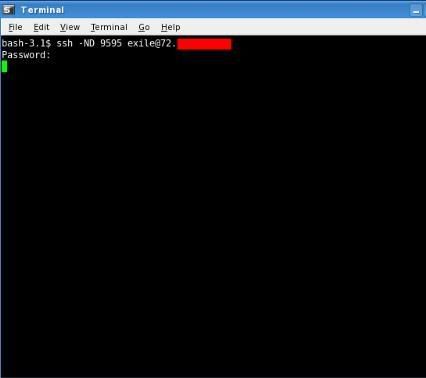
After authentication it will hang. This is what you want.
The -N option is for a non-interactive connection
The -D binds a local port. A high port number so you don't need root privilege.
Once the tunnel is established, we need to bind the browser to send requests through that port.
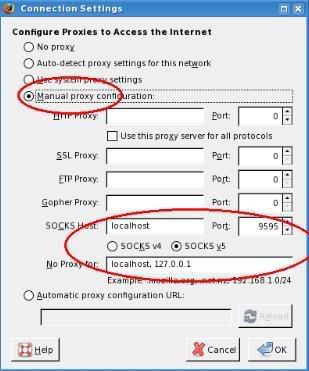
As shown, manually set the proxy port for the same as you bound to the ssh session.
In firefox, Edit/preferences/advanced/Network/connection settings.
Done. Now another visit to an IP checker:
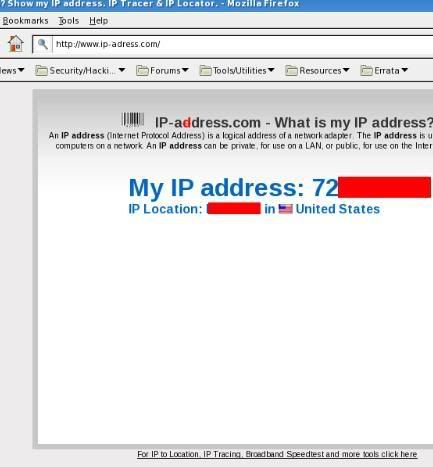
I am tunneled!
Enjoy HaCkInG.....
For example, a WIFI hotspot, where you don't want your browsing sniffed or if you live in a country where your activities are monitored, but you have foreign shell access.
This tutorial uses linux and firefox, I assume it would be pretty easy to do in windows with putty or something. I have added all basics of ssh tunneling in my previous post SSH Tunneling: Hack/ Bypass Firewall restrictions.
To get started, first, here's me without the tunnel:
First, I need to set up the tunnel:
After authentication it will hang. This is what you want.
The -N option is for a non-interactive connection
The -D binds a local port. A high port number so you don't need root privilege.
Once the tunnel is established, we need to bind the browser to send requests through that port.
As shown, manually set the proxy port for the same as you bound to the ssh session.
In firefox, Edit/preferences/advanced/Network/connection settings.
Done. Now another visit to an IP checker:
I am tunneled!
Enjoy HaCkInG.....
SSH Tunneling: Hack/ Bypass Firewall restrictions
Few days back, i was asked by one of my friend about "ssh tunneling" which he encountered while surfing on net. But neither i nor any of my friends around were having any idea about "ssh tunneling". Then i worked on this topic using my best friend on web(ofcourse Google) and finally arrived at this article which focusses on all aspects of ssh tunneling. I found this concept very useful to bypass firewall restrictions and thought could help you guys in your work. Hence, i added this article in HaCkInG N CrAcKiNg Tips. Just keep checking because i will be adding one more article on ssh tunneling (with pictures).
Update: You can check out the second tutorial on ssh tunneling here.
First of all you should notice that it may be illegal to tunnel your corporate, college, university firewall or whatever so you're doing this on your own risk I am in no way responsible for your actions!
Example:
You are behind a firewall which limits "irc.xyz.org:9999" out *it's the ssl port of the xyz-irc* so you need to tunnel the firewall. In most cases port 80-outbound-connections are allowed so lets focus on this one.
There are many different methods to tunnel the firewall "findnot.com, loophole-server, ssl-http-tunneling with own or free tools and so on... google it* but i will get on SSH-Tunneling cause it's free and usual secure.
First of all you need a SSH-Server running on Port 80 in the internet. There are free SSH-Servers for LINUX, UNIX, Mac OSX, Windows ... google it you will find em... for Win-Users i suggest using the one coming with cygwin cause it is the one from LINUX.
If you don't own a box ask a friend or something like that to set one up for you... in many cases there are some boxes on which students have ssh-accounts so try to use your ssh-account to tunnel through it. *notice for this in most cases port 22-outbound connections must be allowed cause its the SSH-standard-port.
So, now what we do is making a SSH-Tunnel which runs a SOCKS-5-Proxy locally so we can tunnel EVERY application through it. Eeven the ones without SOCKS-support can be tunneled through if you use tools like SOCKSCap, FreeCAP, PermeoSecurity-Driver or for LINUX --> TSOCKS *google them you will find them.
Under Linux you can simply set up a local SOCKS-5 with the standart SSH-Client if you are typing the following command:
[CODE]
root@5[root]# ssh -D 1080 -l root -p 80 yoursshservername.com
Let me explain this for *NiX-newbs...
-D sets up the dynamic-local-listening port (1080) it's where you direct your Browser, IRC-Client or whatever to.
-l root <-- thats the user you are logging in with... needn't to be root can also be a normal user with the privilegdes to log in via ssh. -p 80 <-- in our special case the SSH-Server runs on port 80 *to tunnel the wall* so we need to connect to port 80*sounds logic doesn't it?* yoursshservername.com <-- it's the server in the net where you SSH-Server runs... So, now after you are connected to the SSH-Server it asks you if you want to accept it's cipher-key ... of course yes in here. Feel happy you now have a SSH-Tunnel. So now start your X-Chat *just example plz don't tell me X-Chat is not 1337 * and go to [settings]->[options]->[network-setup]
In here put in as a hostname: 127.0.0.1 and as port: 1080 than choose type: SOCKS-5
After successfully done this connect to the xyz irc via /server -ssl irc.xyz.gov 9999 and feel happy cause you tunneled the firewall successfully.
There are tools to do this more simple e.g.:
For Windows the free SSH-Tunnel which can be found here: http://dlmirror.rs4u.com/SSHTunnelSetup.exe
Docs are here : http://www.rs4u.com/SSHTunnel/
If you understood the principle behind the technique there should be no prob to use these to user-friendly tools to make tunnels... they are well documented so i hope that you will be able to do all hack or tunneling of your own by using this ssh tunneling tutorial article.
Happy Tunneling.
Enjoy HaCkInG.....
Update: You can check out the second tutorial on ssh tunneling here.
First of all you should notice that it may be illegal to tunnel your corporate, college, university firewall or whatever so you're doing this on your own risk I am in no way responsible for your actions!
Example:
You are behind a firewall which limits "irc.xyz.org:9999" out *it's the ssl port of the xyz-irc* so you need to tunnel the firewall. In most cases port 80-outbound-connections are allowed so lets focus on this one.
There are many different methods to tunnel the firewall "findnot.com, loophole-server, ssl-http-tunneling with own or free tools and so on... google it* but i will get on SSH-Tunneling cause it's free and usual secure.
First of all you need a SSH-Server running on Port 80 in the internet. There are free SSH-Servers for LINUX, UNIX, Mac OSX, Windows ... google it you will find em... for Win-Users i suggest using the one coming with cygwin cause it is the one from LINUX.
If you don't own a box ask a friend or something like that to set one up for you... in many cases there are some boxes on which students have ssh-accounts so try to use your ssh-account to tunnel through it. *notice for this in most cases port 22-outbound connections must be allowed cause its the SSH-standard-port.
So, now what we do is making a SSH-Tunnel which runs a SOCKS-5-Proxy locally so we can tunnel EVERY application through it. Eeven the ones without SOCKS-support can be tunneled through if you use tools like SOCKSCap, FreeCAP, PermeoSecurity-Driver or for LINUX --> TSOCKS *google them you will find them.
Under Linux you can simply set up a local SOCKS-5 with the standart SSH-Client if you are typing the following command:
[CODE]
root@5[root]# ssh -D 1080 -l root -p 80 yoursshservername.com
Let me explain this for *NiX-newbs...
-D sets up the dynamic-local-listening port (1080) it's where you direct your Browser, IRC-Client or whatever to.
-l root <-- thats the user you are logging in with... needn't to be root can also be a normal user with the privilegdes to log in via ssh. -p 80 <-- in our special case the SSH-Server runs on port 80 *to tunnel the wall* so we need to connect to port 80*sounds logic doesn't it?* yoursshservername.com <-- it's the server in the net where you SSH-Server runs... So, now after you are connected to the SSH-Server it asks you if you want to accept it's cipher-key ... of course yes in here. Feel happy you now have a SSH-Tunnel. So now start your X-Chat *just example plz don't tell me X-Chat is not 1337 * and go to [settings]->[options]->[network-setup]
In here put in as a hostname: 127.0.0.1 and as port: 1080 than choose type: SOCKS-5
After successfully done this connect to the xyz irc via /server -ssl irc.xyz.gov 9999 and feel happy cause you tunneled the firewall successfully.
There are tools to do this more simple e.g.:
For Windows the free SSH-Tunnel which can be found here: http://dlmirror.rs4u.com/SSHTunnelSetup.exe
Docs are here : http://www.rs4u.com/SSHTunnel/
If you understood the principle behind the technique there should be no prob to use these to user-friendly tools to make tunnels... they are well documented so i hope that you will be able to do all hack or tunneling of your own by using this ssh tunneling tutorial article.
Happy Tunneling.
Enjoy HaCkInG.....
SSH Tunneling: Hack/ Bypass Firewall restrictions Part 2.
I've been working with ssh tunneling, and thought I'd pass along a practical example of implementing it.This use, web browsing through an encrypted tunnel through another host, is useful for many scenarios.
For example, a WIFI hotspot, where you don't want your browsing sniffed or if you live in a country where your activities are monitored, but you have foreign shell access.
This tutorial uses linux and firefox, I assume it would be pretty easy to do in windows with putty or something. I have added all basics of ssh tunneling in my previous post SSH Tunneling: Hack/ Bypass Firewall restrictions.
To get started, first, here's me without the tunnel:
First, I need to set up the tunnel:
After authentication it will hang. This is what you want.
The -N option is for a non-interactive connection
The -D binds a local port. A high port number so you don't need root privilege.
Once the tunnel is established, we need to bind the browser to send requests through that port.
As shown, manually set the proxy port for the same as you bound to the ssh session.
In firefox, Edit/preferences/advanced/Network/connection settings.
Done. Now another visit to an IP checker:
I am tunneled!
Enjoy HaCkInG.....
For example, a WIFI hotspot, where you don't want your browsing sniffed or if you live in a country where your activities are monitored, but you have foreign shell access.
This tutorial uses linux and firefox, I assume it would be pretty easy to do in windows with putty or something. I have added all basics of ssh tunneling in my previous post SSH Tunneling: Hack/ Bypass Firewall restrictions.
To get started, first, here's me without the tunnel:
First, I need to set up the tunnel:
After authentication it will hang. This is what you want.
The -N option is for a non-interactive connection
The -D binds a local port. A high port number so you don't need root privilege.
Once the tunnel is established, we need to bind the browser to send requests through that port.
As shown, manually set the proxy port for the same as you bound to the ssh session.
In firefox, Edit/preferences/advanced/Network/connection settings.
Done. Now another visit to an IP checker:
I am tunneled!
Enjoy HaCkInG.....
SSH Tunneling: Hack/ Bypass Firewall restrictions
Few days back, i was asked by one of my friend about "ssh tunneling" which he encountered while surfing on net. But neither i nor any of my friends around were having any idea about "ssh tunneling". Then i worked on this topic using my best friend on web(ofcourse Google) and finally arrived at this article which focusses on all aspects of ssh tunneling. I found this concept very useful to bypass firewall restrictions and thought could help you guys in your work. Hence, i added this article in HaCkInG N CrAcKiNg Tips. Just keep checking because i will be adding one more article on ssh tunneling (with pictures).
Update: You can check out the second tutorial on ssh tunneling here.
First of all you should notice that it may be illegal to tunnel your corporate, college, university firewall or whatever so you're doing this on your own risk I am in no way responsible for your actions!
Example:
You are behind a firewall which limits "irc.xyz.org:9999" out *it's the ssl port of the xyz-irc* so you need to tunnel the firewall. In most cases port 80-outbound-connections are allowed so lets focus on this one.
There are many different methods to tunnel the firewall "findnot.com, loophole-server, ssl-http-tunneling with own or free tools and so on... google it* but i will get on SSH-Tunneling cause it's free and usual secure.
First of all you need a SSH-Server running on Port 80 in the internet. There are free SSH-Servers for LINUX, UNIX, Mac OSX, Windows ... google it you will find em... for Win-Users i suggest using the one coming with cygwin cause it is the one from LINUX.
If you don't own a box ask a friend or something like that to set one up for you... in many cases there are some boxes on which students have ssh-accounts so try to use your ssh-account to tunnel through it. *notice for this in most cases port 22-outbound connections must be allowed cause its the SSH-standard-port.
So, now what we do is making a SSH-Tunnel which runs a SOCKS-5-Proxy locally so we can tunnel EVERY application through it. Eeven the ones without SOCKS-support can be tunneled through if you use tools like SOCKSCap, FreeCAP, PermeoSecurity-Driver or for LINUX --> TSOCKS *google them you will find them.
Under Linux you can simply set up a local SOCKS-5 with the standart SSH-Client if you are typing the following command:
[CODE]
root@5[root]# ssh -D 1080 -l root -p 80 yoursshservername.com
Let me explain this for *NiX-newbs...
-D sets up the dynamic-local-listening port (1080) it's where you direct your Browser, IRC-Client or whatever to.
-l root <-- thats the user you are logging in with... needn't to be root can also be a normal user with the privilegdes to log in via ssh. -p 80 <-- in our special case the SSH-Server runs on port 80 *to tunnel the wall* so we need to connect to port 80*sounds logic doesn't it?* yoursshservername.com <-- it's the server in the net where you SSH-Server runs... So, now after you are connected to the SSH-Server it asks you if you want to accept it's cipher-key ... of course yes in here. Feel happy you now have a SSH-Tunnel. So now start your X-Chat *just example plz don't tell me X-Chat is not 1337 * and go to [settings]->[options]->[network-setup]
In here put in as a hostname: 127.0.0.1 and as port: 1080 than choose type: SOCKS-5
After successfully done this connect to the xyz irc via /server -ssl irc.xyz.gov 9999 and feel happy cause you tunneled the firewall successfully.
There are tools to do this more simple e.g.:
For Windows the free SSH-Tunnel which can be found here: http://dlmirror.rs4u.com/SSHTunnelSetup.exe
Docs are here : http://www.rs4u.com/SSHTunnel/
If you understood the principle behind the technique there should be no prob to use these to user-friendly tools to make tunnels... they are well documented so i hope that you will be able to do all hack or tunneling of your own by using this ssh tunneling tutorial article.
Happy Tunneling.
Enjoy HaCkInG.....
Update: You can check out the second tutorial on ssh tunneling here.
First of all you should notice that it may be illegal to tunnel your corporate, college, university firewall or whatever so you're doing this on your own risk I am in no way responsible for your actions!
Example:
You are behind a firewall which limits "irc.xyz.org:9999" out *it's the ssl port of the xyz-irc* so you need to tunnel the firewall. In most cases port 80-outbound-connections are allowed so lets focus on this one.
There are many different methods to tunnel the firewall "findnot.com, loophole-server, ssl-http-tunneling with own or free tools and so on... google it* but i will get on SSH-Tunneling cause it's free and usual secure.
First of all you need a SSH-Server running on Port 80 in the internet. There are free SSH-Servers for LINUX, UNIX, Mac OSX, Windows ... google it you will find em... for Win-Users i suggest using the one coming with cygwin cause it is the one from LINUX.
If you don't own a box ask a friend or something like that to set one up for you... in many cases there are some boxes on which students have ssh-accounts so try to use your ssh-account to tunnel through it. *notice for this in most cases port 22-outbound connections must be allowed cause its the SSH-standard-port.
So, now what we do is making a SSH-Tunnel which runs a SOCKS-5-Proxy locally so we can tunnel EVERY application through it. Eeven the ones without SOCKS-support can be tunneled through if you use tools like SOCKSCap, FreeCAP, PermeoSecurity-Driver or for LINUX --> TSOCKS *google them you will find them.
Under Linux you can simply set up a local SOCKS-5 with the standart SSH-Client if you are typing the following command:
[CODE]
root@5[root]# ssh -D 1080 -l root -p 80 yoursshservername.com
Let me explain this for *NiX-newbs...
-D sets up the dynamic-local-listening port (1080) it's where you direct your Browser, IRC-Client or whatever to.
-l root <-- thats the user you are logging in with... needn't to be root can also be a normal user with the privilegdes to log in via ssh. -p 80 <-- in our special case the SSH-Server runs on port 80 *to tunnel the wall* so we need to connect to port 80*sounds logic doesn't it?* yoursshservername.com <-- it's the server in the net where you SSH-Server runs... So, now after you are connected to the SSH-Server it asks you if you want to accept it's cipher-key ... of course yes in here. Feel happy you now have a SSH-Tunnel. So now start your X-Chat *just example plz don't tell me X-Chat is not 1337 * and go to [settings]->[options]->[network-setup]
In here put in as a hostname: 127.0.0.1 and as port: 1080 than choose type: SOCKS-5
After successfully done this connect to the xyz irc via /server -ssl irc.xyz.gov 9999 and feel happy cause you tunneled the firewall successfully.
There are tools to do this more simple e.g.:
For Windows the free SSH-Tunnel which can be found here: http://dlmirror.rs4u.com/SSHTunnelSetup.exe
Docs are here : http://www.rs4u.com/SSHTunnel/
If you understood the principle behind the technique there should be no prob to use these to user-friendly tools to make tunnels... they are well documented so i hope that you will be able to do all hack or tunneling of your own by using this ssh tunneling tutorial article.
Happy Tunneling.
Enjoy HaCkInG.....
SSH Tunneling: Hack/ Bypass Firewall restrictions Part 2.
I've been working with ssh tunneling, and thought I'd pass along a practical example of implementing it.This use, web browsing through an encrypted tunnel through another host, is useful for many scenarios.
For example, a WIFI hotspot, where you don't want your browsing sniffed or if you live in a country where your activities are monitored, but you have foreign shell access.
This tutorial uses linux and firefox, I assume it would be pretty easy to do in windows with putty or something. I have added all basics of ssh tunneling in my previous post SSH Tunneling: Hack/ Bypass Firewall restrictions.
To get started, first, here's me without the tunnel:
First, I need to set up the tunnel:
After authentication it will hang. This is what you want.
The -N option is for a non-interactive connection
The -D binds a local port. A high port number so you don't need root privilege.
Once the tunnel is established, we need to bind the browser to send requests through that port.
As shown, manually set the proxy port for the same as you bound to the ssh session.
In firefox, Edit/preferences/advanced/Network/connection settings.
Done. Now another visit to an IP checker:
I am tunneled!
Enjoy HaCkInG.....
For example, a WIFI hotspot, where you don't want your browsing sniffed or if you live in a country where your activities are monitored, but you have foreign shell access.
This tutorial uses linux and firefox, I assume it would be pretty easy to do in windows with putty or something. I have added all basics of ssh tunneling in my previous post SSH Tunneling: Hack/ Bypass Firewall restrictions.
To get started, first, here's me without the tunnel:
First, I need to set up the tunnel:
After authentication it will hang. This is what you want.
The -N option is for a non-interactive connection
The -D binds a local port. A high port number so you don't need root privilege.
Once the tunnel is established, we need to bind the browser to send requests through that port.
As shown, manually set the proxy port for the same as you bound to the ssh session.
In firefox, Edit/preferences/advanced/Network/connection settings.
Done. Now another visit to an IP checker:
I am tunneled!
Enjoy HaCkInG.....
SSH Tunneling: Hack/ Bypass Firewall restrictions
Few days back, i was asked by one of my friend about "ssh tunneling" which he encountered while surfing on net. But neither i nor any of my friends around were having any idea about "ssh tunneling". Then i worked on this topic using my best friend on web(ofcourse Google) and finally arrived at this article which focusses on all aspects of ssh tunneling. I found this concept very useful to bypass firewall restrictions and thought could help you guys in your work. Hence, i added this article in HaCkInG N CrAcKiNg Tips. Just keep checking because i will be adding one more article on ssh tunneling (with pictures).
Update: You can check out the second tutorial on ssh tunneling here.
First of all you should notice that it may be illegal to tunnel your corporate, college, university firewall or whatever so you're doing this on your own risk I am in no way responsible for your actions!
Example:
You are behind a firewall which limits "irc.xyz.org:9999" out *it's the ssl port of the xyz-irc* so you need to tunnel the firewall. In most cases port 80-outbound-connections are allowed so lets focus on this one.
There are many different methods to tunnel the firewall "findnot.com, loophole-server, ssl-http-tunneling with own or free tools and so on... google it* but i will get on SSH-Tunneling cause it's free and usual secure.
First of all you need a SSH-Server running on Port 80 in the internet. There are free SSH-Servers for LINUX, UNIX, Mac OSX, Windows ... google it you will find em... for Win-Users i suggest using the one coming with cygwin cause it is the one from LINUX.
If you don't own a box ask a friend or something like that to set one up for you... in many cases there are some boxes on which students have ssh-accounts so try to use your ssh-account to tunnel through it. *notice for this in most cases port 22-outbound connections must be allowed cause its the SSH-standard-port.
So, now what we do is making a SSH-Tunnel which runs a SOCKS-5-Proxy locally so we can tunnel EVERY application through it. Eeven the ones without SOCKS-support can be tunneled through if you use tools like SOCKSCap, FreeCAP, PermeoSecurity-Driver or for LINUX --> TSOCKS *google them you will find them.
Under Linux you can simply set up a local SOCKS-5 with the standart SSH-Client if you are typing the following command:
[CODE]
root@5[root]# ssh -D 1080 -l root -p 80 yoursshservername.com
Let me explain this for *NiX-newbs...
-D sets up the dynamic-local-listening port (1080) it's where you direct your Browser, IRC-Client or whatever to.
-l root <-- thats the user you are logging in with... needn't to be root can also be a normal user with the privilegdes to log in via ssh. -p 80 <-- in our special case the SSH-Server runs on port 80 *to tunnel the wall* so we need to connect to port 80*sounds logic doesn't it?* yoursshservername.com <-- it's the server in the net where you SSH-Server runs... So, now after you are connected to the SSH-Server it asks you if you want to accept it's cipher-key ... of course yes in here. Feel happy you now have a SSH-Tunnel. So now start your X-Chat *just example plz don't tell me X-Chat is not 1337 * and go to [settings]->[options]->[network-setup]
In here put in as a hostname: 127.0.0.1 and as port: 1080 than choose type: SOCKS-5
After successfully done this connect to the xyz irc via /server -ssl irc.xyz.gov 9999 and feel happy cause you tunneled the firewall successfully.
There are tools to do this more simple e.g.:
For Windows the free SSH-Tunnel which can be found here: http://dlmirror.rs4u.com/SSHTunnelSetup.exe
Docs are here : http://www.rs4u.com/SSHTunnel/
If you understood the principle behind the technique there should be no prob to use these to user-friendly tools to make tunnels... they are well documented so i hope that you will be able to do all hack or tunneling of your own by using this ssh tunneling tutorial article.
Happy Tunneling.
Enjoy HaCkInG.....
Update: You can check out the second tutorial on ssh tunneling here.
First of all you should notice that it may be illegal to tunnel your corporate, college, university firewall or whatever so you're doing this on your own risk I am in no way responsible for your actions!
Example:
You are behind a firewall which limits "irc.xyz.org:9999" out *it's the ssl port of the xyz-irc* so you need to tunnel the firewall. In most cases port 80-outbound-connections are allowed so lets focus on this one.
There are many different methods to tunnel the firewall "findnot.com, loophole-server, ssl-http-tunneling with own or free tools and so on... google it* but i will get on SSH-Tunneling cause it's free and usual secure.
First of all you need a SSH-Server running on Port 80 in the internet. There are free SSH-Servers for LINUX, UNIX, Mac OSX, Windows ... google it you will find em... for Win-Users i suggest using the one coming with cygwin cause it is the one from LINUX.
If you don't own a box ask a friend or something like that to set one up for you... in many cases there are some boxes on which students have ssh-accounts so try to use your ssh-account to tunnel through it. *notice for this in most cases port 22-outbound connections must be allowed cause its the SSH-standard-port.
So, now what we do is making a SSH-Tunnel which runs a SOCKS-5-Proxy locally so we can tunnel EVERY application through it. Eeven the ones without SOCKS-support can be tunneled through if you use tools like SOCKSCap, FreeCAP, PermeoSecurity-Driver or for LINUX --> TSOCKS *google them you will find them.
Under Linux you can simply set up a local SOCKS-5 with the standart SSH-Client if you are typing the following command:
[CODE]
root@5[root]# ssh -D 1080 -l root -p 80 yoursshservername.com
Let me explain this for *NiX-newbs...
-D sets up the dynamic-local-listening port (1080) it's where you direct your Browser, IRC-Client or whatever to.
-l root <-- thats the user you are logging in with... needn't to be root can also be a normal user with the privilegdes to log in via ssh. -p 80 <-- in our special case the SSH-Server runs on port 80 *to tunnel the wall* so we need to connect to port 80*sounds logic doesn't it?* yoursshservername.com <-- it's the server in the net where you SSH-Server runs... So, now after you are connected to the SSH-Server it asks you if you want to accept it's cipher-key ... of course yes in here. Feel happy you now have a SSH-Tunnel. So now start your X-Chat *just example plz don't tell me X-Chat is not 1337 * and go to [settings]->[options]->[network-setup]
In here put in as a hostname: 127.0.0.1 and as port: 1080 than choose type: SOCKS-5
After successfully done this connect to the xyz irc via /server -ssl irc.xyz.gov 9999 and feel happy cause you tunneled the firewall successfully.
There are tools to do this more simple e.g.:
For Windows the free SSH-Tunnel which can be found here: http://dlmirror.rs4u.com/SSHTunnelSetup.exe
Docs are here : http://www.rs4u.com/SSHTunnel/
If you understood the principle behind the technique there should be no prob to use these to user-friendly tools to make tunnels... they are well documented so i hope that you will be able to do all hack or tunneling of your own by using this ssh tunneling tutorial article.
Happy Tunneling.
Enjoy HaCkInG.....
Best way to "Recover" forgotten Windows Vista password
I found many Windows Vista users asking for password recovery methodology. The article below written by Marius Oiaga provides the useful trick to recover forgotten Windows Vista password. I have added method to hack Windows Vista user account in my post Hack Windows Vista admin account.
Recovering lost passwords is not a problem new to Windows Vista. Sure, in a manner similar to Windows XP, Vista will enable users to create an adjacent password hint that the user can turn to in case of need. But what about a severe case of amnesia. No password hint will point you in the right direction. Fortunately, Windows Vista has a built in mechanism designed to help with password recovery.
First off though, you should know that if the account with the misplaced password is not the administrator, then recovery is not even a problem.The administrator can simply change the password and allow the user access back to the account. This action however is not without its downside. If the administrator performs the said task, then you will not be able to access encrypted files, email messages and personal credentials. This is a trade-off that might be, or might not be worth it, depending on the context and on the information you risk losing.

The Windows Vista password recovery mechanism applies mainly to computers that are not part of a domain. If you have made your way to the User Accounts in Windows Vista via Control Panel then you might have noticed the "Create a password reset disk" option in the top left corner.
From within a Windows Vista account, a user can create a password reset disk. A user only needs to create a single password reset disk and store it in a secure location. The disk is a preemptive measure that is actually independent of the account's password. Users of the disk will be able to reset the account's password.
The guys over here might now be able to overcome their lost Windows Vista passwords. If you know any popular method for recovering Windows Vista passwords, just help out other guys over here by mentioning in comments section.
Enjoy HaCkInG...
Recovering lost passwords is not a problem new to Windows Vista. Sure, in a manner similar to Windows XP, Vista will enable users to create an adjacent password hint that the user can turn to in case of need. But what about a severe case of amnesia. No password hint will point you in the right direction. Fortunately, Windows Vista has a built in mechanism designed to help with password recovery.
First off though, you should know that if the account with the misplaced password is not the administrator, then recovery is not even a problem.The administrator can simply change the password and allow the user access back to the account. This action however is not without its downside. If the administrator performs the said task, then you will not be able to access encrypted files, email messages and personal credentials. This is a trade-off that might be, or might not be worth it, depending on the context and on the information you risk losing.
The Windows Vista password recovery mechanism applies mainly to computers that are not part of a domain. If you have made your way to the User Accounts in Windows Vista via Control Panel then you might have noticed the "Create a password reset disk" option in the top left corner.
From within a Windows Vista account, a user can create a password reset disk. A user only needs to create a single password reset disk and store it in a secure location. The disk is a preemptive measure that is actually independent of the account's password. Users of the disk will be able to reset the account's password.
The guys over here might now be able to overcome their lost Windows Vista passwords. If you know any popular method for recovering Windows Vista passwords, just help out other guys over here by mentioning in comments section.
Enjoy HaCkInG...
Myspace hack: Delete myspace account.
I received an email 8-10 days before requesting about the myspace hack/trick to delete someones myspace account. I wasnt cognizant about this myspace hack so I searched the web for this hack and now presenting you with this beautiful myspace account deletion hack. Though I havent tried the hack yet, you can help by trying out this hack on ur fake myspace account and commenting about the results. For more myspace hacking, refer 5 best ways to hack Myspace account password.
The myspace flaw is simple. It’s not a flaw in myspace, but in the way it’s setup. It’s just the same as a mailing list. You sign up with your email, and unsubscribe by sending an email to an unsubscribe address with “unsubscribe” in the text field. When someone wants to legitimately unsubscribe to myspace, they open the form that does such, and unsubscribe. All that does is send an email from you (your myspace account) to an email address that myspace uses for deleting accounts.

All you need to do is send an email from the victim’s email, to the myspace server email used for removing accounts. This is very easy to do.
The email address that myspace uses for account deletion is. cancelaccount[at]myspace.com
When you do delete an account, if you look in the URL bar when you delete your own myspace account, it shows the variable input used, and that’s how the email address was found.
So what a no brainer, replace it with someone else’s.
So, just spoof an email from the target, with subject: delete, body: delete account , to cancelaccount[at]myspace.com
The easiest way is to first, communicate with them via AIM or in person, and just tell them you have some funny pictures of them or any other reason they won’t resist. Just social engineer them.
Mitnick has written a great book on the subject, “Art of deception”.
Once you have their myspace email to be hacked, send a spoofed email from their email, to - Email address removed from bots quote post to view - with the subject:delete and body delete account.
I don’t think it matters what you put in the subject and body, since It’s automated I’m assuming, and it’s a computer that looks at those emails, not a person. If you don’t know how to send spoofed emails, go to Google and find a tutorial how to send spoofed emails to do such. You need to learn how to use Google to play with computers. You can connect to an SMTP server (use the one on your ISP) and issue it the commands to make and send an email.
That’s it, within 48 hours the myspace account will be deleted. So friends, as early stated, i havent tried out this myspace account deletion hack, so you can comment your experiences to help others. But remember, this myspace hack is meant for educational purpose only...
Enjoy HaCkInG.....
The myspace flaw is simple. It’s not a flaw in myspace, but in the way it’s setup. It’s just the same as a mailing list. You sign up with your email, and unsubscribe by sending an email to an unsubscribe address with “unsubscribe” in the text field. When someone wants to legitimately unsubscribe to myspace, they open the form that does such, and unsubscribe. All that does is send an email from you (your myspace account) to an email address that myspace uses for deleting accounts.
Hack/delete myspace account:
All you need to do is send an email from the victim’s email, to the myspace server email used for removing accounts. This is very easy to do.
The email address that myspace uses for account deletion is. cancelaccount[at]myspace.com
Wow who would have thought it?
When you do delete an account, if you look in the URL bar when you delete your own myspace account, it shows the variable input used, and that’s how the email address was found.
So what a no brainer, replace it with someone else’s.
So, just spoof an email from the target, with subject: delete, body: delete account , to cancelaccount[at]myspace.com
How to get Myspace email?
The easiest way is to first, communicate with them via AIM or in person, and just tell them you have some funny pictures of them or any other reason they won’t resist. Just social engineer them.
Mitnick has written a great book on the subject, “Art of deception”.
Once you have their myspace email to be hacked, send a spoofed email from their email, to - Email address removed from bots quote post to view - with the subject:delete and body delete account.
I don’t think it matters what you put in the subject and body, since It’s automated I’m assuming, and it’s a computer that looks at those emails, not a person. If you don’t know how to send spoofed emails, go to Google and find a tutorial how to send spoofed emails to do such. You need to learn how to use Google to play with computers. You can connect to an SMTP server (use the one on your ISP) and issue it the commands to make and send an email.
That’s it, within 48 hours the myspace account will be deleted. So friends, as early stated, i havent tried out this myspace account deletion hack, so you can comment your experiences to help others. But remember, this myspace hack is meant for educational purpose only...
Enjoy HaCkInG.....
Best way to "Recover" forgotten Windows Vista password
I found many Windows Vista users asking for password recovery methodology. The article below written by Marius Oiaga provides the useful trick to recover forgotten Windows Vista password. I have added method to hack Windows Vista user account in my post Hack Windows Vista admin account.
Recovering lost passwords is not a problem new to Windows Vista. Sure, in a manner similar to Windows XP, Vista will enable users to create an adjacent password hint that the user can turn to in case of need. But what about a severe case of amnesia. No password hint will point you in the right direction. Fortunately, Windows Vista has a built in mechanism designed to help with password recovery.
First off though, you should know that if the account with the misplaced password is not the administrator, then recovery is not even a problem.The administrator can simply change the password and allow the user access back to the account. This action however is not without its downside. If the administrator performs the said task, then you will not be able to access encrypted files, email messages and personal credentials. This is a trade-off that might be, or might not be worth it, depending on the context and on the information you risk losing.
The Windows Vista password recovery mechanism applies mainly to computers that are not part of a domain. If you have made your way to the User Accounts in Windows Vista via Control Panel then you might have noticed the "Create a password reset disk" option in the top left corner.
From within a Windows Vista account, a user can create a password reset disk. A user only needs to create a single password reset disk and store it in a secure location. The disk is a preemptive measure that is actually independent of the account's password. Users of the disk will be able to reset the account's password.
The guys over here might now be able to overcome their lost Windows Vista passwords. If you know any popular method for recovering Windows Vista passwords, just help out other guys over here by mentioning in comments section.
Enjoy HaCkInG...
Recovering lost passwords is not a problem new to Windows Vista. Sure, in a manner similar to Windows XP, Vista will enable users to create an adjacent password hint that the user can turn to in case of need. But what about a severe case of amnesia. No password hint will point you in the right direction. Fortunately, Windows Vista has a built in mechanism designed to help with password recovery.
First off though, you should know that if the account with the misplaced password is not the administrator, then recovery is not even a problem.The administrator can simply change the password and allow the user access back to the account. This action however is not without its downside. If the administrator performs the said task, then you will not be able to access encrypted files, email messages and personal credentials. This is a trade-off that might be, or might not be worth it, depending on the context and on the information you risk losing.
The Windows Vista password recovery mechanism applies mainly to computers that are not part of a domain. If you have made your way to the User Accounts in Windows Vista via Control Panel then you might have noticed the "Create a password reset disk" option in the top left corner.
From within a Windows Vista account, a user can create a password reset disk. A user only needs to create a single password reset disk and store it in a secure location. The disk is a preemptive measure that is actually independent of the account's password. Users of the disk will be able to reset the account's password.
The guys over here might now be able to overcome their lost Windows Vista passwords. If you know any popular method for recovering Windows Vista passwords, just help out other guys over here by mentioning in comments section.
Enjoy HaCkInG...
Myspace hack: Delete myspace account.
I received an email 8-10 days before requesting about the myspace hack/trick to delete someones myspace account. I wasnt cognizant about this myspace hack so I searched the web for this hack and now presenting you with this beautiful myspace account deletion hack. Though I havent tried the hack yet, you can help by trying out this hack on ur fake myspace account and commenting about the results. For more myspace hacking, refer 5 best ways to hack Myspace account password.
The myspace flaw is simple. It’s not a flaw in myspace, but in the way it’s setup. It’s just the same as a mailing list. You sign up with your email, and unsubscribe by sending an email to an unsubscribe address with “unsubscribe” in the text field. When someone wants to legitimately unsubscribe to myspace, they open the form that does such, and unsubscribe. All that does is send an email from you (your myspace account) to an email address that myspace uses for deleting accounts.
All you need to do is send an email from the victim’s email, to the myspace server email used for removing accounts. This is very easy to do.
The email address that myspace uses for account deletion is. cancelaccount[at]myspace.com
When you do delete an account, if you look in the URL bar when you delete your own myspace account, it shows the variable input used, and that’s how the email address was found.
So what a no brainer, replace it with someone else’s.
So, just spoof an email from the target, with subject: delete, body: delete account , to cancelaccount[at]myspace.com
The easiest way is to first, communicate with them via AIM or in person, and just tell them you have some funny pictures of them or any other reason they won’t resist. Just social engineer them.
Mitnick has written a great book on the subject, “Art of deception”.
Once you have their myspace email to be hacked, send a spoofed email from their email, to - Email address removed from bots quote post to view - with the subject:delete and body delete account.
I don’t think it matters what you put in the subject and body, since It’s automated I’m assuming, and it’s a computer that looks at those emails, not a person. If you don’t know how to send spoofed emails, go to Google and find a tutorial how to send spoofed emails to do such. You need to learn how to use Google to play with computers. You can connect to an SMTP server (use the one on your ISP) and issue it the commands to make and send an email.
That’s it, within 48 hours the myspace account will be deleted. So friends, as early stated, i havent tried out this myspace account deletion hack, so you can comment your experiences to help others. But remember, this myspace hack is meant for educational purpose only...
Enjoy HaCkInG.....
The myspace flaw is simple. It’s not a flaw in myspace, but in the way it’s setup. It’s just the same as a mailing list. You sign up with your email, and unsubscribe by sending an email to an unsubscribe address with “unsubscribe” in the text field. When someone wants to legitimately unsubscribe to myspace, they open the form that does such, and unsubscribe. All that does is send an email from you (your myspace account) to an email address that myspace uses for deleting accounts.
Hack/delete myspace account:
All you need to do is send an email from the victim’s email, to the myspace server email used for removing accounts. This is very easy to do.
The email address that myspace uses for account deletion is. cancelaccount[at]myspace.com
Wow who would have thought it?
When you do delete an account, if you look in the URL bar when you delete your own myspace account, it shows the variable input used, and that’s how the email address was found.
So what a no brainer, replace it with someone else’s.
So, just spoof an email from the target, with subject: delete, body: delete account , to cancelaccount[at]myspace.com
How to get Myspace email?
The easiest way is to first, communicate with them via AIM or in person, and just tell them you have some funny pictures of them or any other reason they won’t resist. Just social engineer them.
Mitnick has written a great book on the subject, “Art of deception”.
Once you have their myspace email to be hacked, send a spoofed email from their email, to - Email address removed from bots quote post to view - with the subject:delete and body delete account.
I don’t think it matters what you put in the subject and body, since It’s automated I’m assuming, and it’s a computer that looks at those emails, not a person. If you don’t know how to send spoofed emails, go to Google and find a tutorial how to send spoofed emails to do such. You need to learn how to use Google to play with computers. You can connect to an SMTP server (use the one on your ISP) and issue it the commands to make and send an email.
That’s it, within 48 hours the myspace account will be deleted. So friends, as early stated, i havent tried out this myspace account deletion hack, so you can comment your experiences to help others. But remember, this myspace hack is meant for educational purpose only...
Enjoy HaCkInG.....
Best way to "Recover" forgotten Windows Vista password
I found many Windows Vista users asking for password recovery methodology. The article below written by Marius Oiaga provides the useful trick to recover forgotten Windows Vista password. I have added method to hack Windows Vista user account in my post Hack Windows Vista admin account.
Recovering lost passwords is not a problem new to Windows Vista. Sure, in a manner similar to Windows XP, Vista will enable users to create an adjacent password hint that the user can turn to in case of need. But what about a severe case of amnesia. No password hint will point you in the right direction. Fortunately, Windows Vista has a built in mechanism designed to help with password recovery.
First off though, you should know that if the account with the misplaced password is not the administrator, then recovery is not even a problem.The administrator can simply change the password and allow the user access back to the account. This action however is not without its downside. If the administrator performs the said task, then you will not be able to access encrypted files, email messages and personal credentials. This is a trade-off that might be, or might not be worth it, depending on the context and on the information you risk losing.
The Windows Vista password recovery mechanism applies mainly to computers that are not part of a domain. If you have made your way to the User Accounts in Windows Vista via Control Panel then you might have noticed the "Create a password reset disk" option in the top left corner.
From within a Windows Vista account, a user can create a password reset disk. A user only needs to create a single password reset disk and store it in a secure location. The disk is a preemptive measure that is actually independent of the account's password. Users of the disk will be able to reset the account's password.
The guys over here might now be able to overcome their lost Windows Vista passwords. If you know any popular method for recovering Windows Vista passwords, just help out other guys over here by mentioning in comments section.
Enjoy HaCkInG...
Recovering lost passwords is not a problem new to Windows Vista. Sure, in a manner similar to Windows XP, Vista will enable users to create an adjacent password hint that the user can turn to in case of need. But what about a severe case of amnesia. No password hint will point you in the right direction. Fortunately, Windows Vista has a built in mechanism designed to help with password recovery.
First off though, you should know that if the account with the misplaced password is not the administrator, then recovery is not even a problem.The administrator can simply change the password and allow the user access back to the account. This action however is not without its downside. If the administrator performs the said task, then you will not be able to access encrypted files, email messages and personal credentials. This is a trade-off that might be, or might not be worth it, depending on the context and on the information you risk losing.
The Windows Vista password recovery mechanism applies mainly to computers that are not part of a domain. If you have made your way to the User Accounts in Windows Vista via Control Panel then you might have noticed the "Create a password reset disk" option in the top left corner.
From within a Windows Vista account, a user can create a password reset disk. A user only needs to create a single password reset disk and store it in a secure location. The disk is a preemptive measure that is actually independent of the account's password. Users of the disk will be able to reset the account's password.
The guys over here might now be able to overcome their lost Windows Vista passwords. If you know any popular method for recovering Windows Vista passwords, just help out other guys over here by mentioning in comments section.
Enjoy HaCkInG...
Myspace hack: Delete myspace account.
I received an email 8-10 days before requesting about the myspace hack/trick to delete someones myspace account. I wasnt cognizant about this myspace hack so I searched the web for this hack and now presenting you with this beautiful myspace account deletion hack. Though I havent tried the hack yet, you can help by trying out this hack on ur fake myspace account and commenting about the results. For more myspace hacking, refer 5 best ways to hack Myspace account password.
The myspace flaw is simple. It’s not a flaw in myspace, but in the way it’s setup. It’s just the same as a mailing list. You sign up with your email, and unsubscribe by sending an email to an unsubscribe address with “unsubscribe” in the text field. When someone wants to legitimately unsubscribe to myspace, they open the form that does such, and unsubscribe. All that does is send an email from you (your myspace account) to an email address that myspace uses for deleting accounts.
All you need to do is send an email from the victim’s email, to the myspace server email used for removing accounts. This is very easy to do.
The email address that myspace uses for account deletion is. cancelaccount[at]myspace.com
When you do delete an account, if you look in the URL bar when you delete your own myspace account, it shows the variable input used, and that’s how the email address was found.
So what a no brainer, replace it with someone else’s.
So, just spoof an email from the target, with subject: delete, body: delete account , to cancelaccount[at]myspace.com
The easiest way is to first, communicate with them via AIM or in person, and just tell them you have some funny pictures of them or any other reason they won’t resist. Just social engineer them.
Mitnick has written a great book on the subject, “Art of deception”.
Once you have their myspace email to be hacked, send a spoofed email from their email, to - Email address removed from bots quote post to view - with the subject:delete and body delete account.
I don’t think it matters what you put in the subject and body, since It’s automated I’m assuming, and it’s a computer that looks at those emails, not a person. If you don’t know how to send spoofed emails, go to Google and find a tutorial how to send spoofed emails to do such. You need to learn how to use Google to play with computers. You can connect to an SMTP server (use the one on your ISP) and issue it the commands to make and send an email.
That’s it, within 48 hours the myspace account will be deleted. So friends, as early stated, i havent tried out this myspace account deletion hack, so you can comment your experiences to help others. But remember, this myspace hack is meant for educational purpose only...
Enjoy HaCkInG.....
The myspace flaw is simple. It’s not a flaw in myspace, but in the way it’s setup. It’s just the same as a mailing list. You sign up with your email, and unsubscribe by sending an email to an unsubscribe address with “unsubscribe” in the text field. When someone wants to legitimately unsubscribe to myspace, they open the form that does such, and unsubscribe. All that does is send an email from you (your myspace account) to an email address that myspace uses for deleting accounts.
Hack/delete myspace account:
All you need to do is send an email from the victim’s email, to the myspace server email used for removing accounts. This is very easy to do.
The email address that myspace uses for account deletion is. cancelaccount[at]myspace.com
Wow who would have thought it?
When you do delete an account, if you look in the URL bar when you delete your own myspace account, it shows the variable input used, and that’s how the email address was found.
So what a no brainer, replace it with someone else’s.
So, just spoof an email from the target, with subject: delete, body: delete account , to cancelaccount[at]myspace.com
How to get Myspace email?
The easiest way is to first, communicate with them via AIM or in person, and just tell them you have some funny pictures of them or any other reason they won’t resist. Just social engineer them.
Mitnick has written a great book on the subject, “Art of deception”.
Once you have their myspace email to be hacked, send a spoofed email from their email, to - Email address removed from bots quote post to view - with the subject:delete and body delete account.
I don’t think it matters what you put in the subject and body, since It’s automated I’m assuming, and it’s a computer that looks at those emails, not a person. If you don’t know how to send spoofed emails, go to Google and find a tutorial how to send spoofed emails to do such. You need to learn how to use Google to play with computers. You can connect to an SMTP server (use the one on your ISP) and issue it the commands to make and send an email.
That’s it, within 48 hours the myspace account will be deleted. So friends, as early stated, i havent tried out this myspace account deletion hack, so you can comment your experiences to help others. But remember, this myspace hack is meant for educational purpose only...
Enjoy HaCkInG.....
BlogRoll
Hi buddy bloggers. I am interested in sharing my link with yours. So, if you want me to place your link on my blogroll ie on this page, please follow the procedure I have mentioned at the end.
- TechPraveen
- Danzy World*
- ----------------- (To be filled)
This link exchange will help us both in increasing our PageRank. So friends, if you want to see your link over here, please add my link on your blogroll and mail me with subject "Link exchange" at my mail id: rajwithfriends(at)gmail(dot)com
Please add my site: http://rajeshhackingarticles.blogspot.com with anchor text:
Hack Orkut Password.
Thanks for your co-operation.
-Rajesh.
- TechPraveen
- Danzy World*
- ----------------- (To be filled)
This link exchange will help us both in increasing our PageRank. So friends, if you want to see your link over here, please add my link on your blogroll and mail me with subject "Link exchange" at my mail id: rajwithfriends(at)gmail(dot)com
Please add my site: http://rajeshhackingarticles.blogspot.com with anchor text:
Hack Orkut Password.
Thanks for your co-operation.
-Rajesh.
How to change Windows background.
by RAJESH CHAUKWALE | 7:49 AM in HACK XP., MISCELLANEOUS | comments (0)So lets start.
Changing Windows background.
Windows provides us with this hack by which we can customize our windows background..we can add a special desired image to window background. This can be achieved by opening background display properties:
1.Open Control Panel.
2.Open Display Properties in the Control Panel.
3.Windows 95/98/ME/NT/2000 users click the Background tab, Windows XP users click the Desktop tab.
Windows by itself provides you with some pictures that can be used to serve as background. If you are not satisfied with those, just use browse button and browse to ur destined picture.
Reverting to default window background.
Now, when u have changed your window background, and if you want to undo the changes ie revert to default window background, just select the none option from available window pictures, may be very first one. Remember that when you select none, ur window background will have same color as ur desktop.
To change ur window background in Windows XP, use the option present from the window where u customize desktop background. Remaining OS users will have to use Appearance tab.
Customizing image style
Now, when you have added image to ur window background, its time to place it best to match the background. This can be achieved using Stretch, Tile or Center.
Problem fixes:
-While changing your background, remember that Windows 95 users have to use only .BMP images. No other image format supported. If you have image in other format, change it to .BMP format. While, for Windows users, .BMP, .JPG and .GIF image formats are supported.
-If you are not able to view your image as window background, just check out this:
>The image path selected is not a path of a deleted or corrupt image.
>The image selected satisfies format according to ur OS.
>Active Desktop is disabled. If you have no idea about Active desktop, dont worry... i will write on Active desktop in some next articles.
Thats it...if you have any other problem while changing background or any other working hack/trick to change windows background, feel free to mention it in comments section.
Enjoy HaCkInG.....
6 ways how to prevent Gmail from hacker phisher
Nowadays, its very common to hear about various incidents of Gmail hacking by Gmail phisher. Today, online privacy is maintained only if the user is aware of various hacks used to hack email accounts. Hence, i thought of writing an article on the same topic of preventing Gmail from being hacked by hackers. Friends, i highly recommend you to read this article to prevent ur future damages.
What? Your Gmail/Orkut/Blogger already hacked??? No worry... just refer How to get back hacked Gmail, Orkut, Blogger account.
I have explained in my post Hack email account password by phishing., Phishing is the best working method of hacking email account. The advantage of phishing in email account hacking is that victim is not able to recognise the fake page (phisher) as this phisher matches with the original page(depends on hacker skills).

So, here i have mentioned few tips which you should follow to prevent hacking of your email account by hackers. So lets start:
I will recommend use of browser which has phishing filter. Internet browsers like Firefox 3.0(my favorite), Internet Explorer 7, Opera 7x which contain phishing filter should be used for safe browsing.
Yes, this is the main thing you have to remember. Unless and until, you know the person or institute, do not give your sensitive information like userids , passwords, bank account numbers as a reply to any email. In fact, 90% emails demanding such information are meant for hacking..remember !
Check whether there are any suspicious filters not created by you. For checking ur email filters, go to Settings->Filters. If you find any such suspicious filter not created by you, delete it urgently.
Generally, Gmail users are deceived by emails which contain great offers, ads or declaring that u are lucky winner and you should provide listed query information to receive your cash prize. Never click or provide any information for such claiming emails.
To disable forwarding and POP/IMAP, go to Settings-> Forwarding and POP/IMAP and disable forwarding and POP/IMAP.
The most important precaution which one must follow is "do not click on the link" provided in the email without knowing to which page the link will take you. I have added my personal experience of phishing and the method to determine the link target, where i received a paypal phisher, in my article Paypal phisher to hack Paypal account. One more thing, always open link given in email by typing address of site in new tab/window.
Thus, if you will follow these guidelines, i bet ur Gmail account will never be hacked by a phisher. Just remember the guidelines and prevent Gmail account from being hacked by hackers.
Enjoy HaCkInG.....
What? Your Gmail/Orkut/Blogger already hacked??? No worry... just refer How to get back hacked Gmail, Orkut, Blogger account.
>>What is a phisher?
I have explained in my post Hack email account password by phishing., Phishing is the best working method of hacking email account. The advantage of phishing in email account hacking is that victim is not able to recognise the fake page (phisher) as this phisher matches with the original page(depends on hacker skills).
So, here i have mentioned few tips which you should follow to prevent hacking of your email account by hackers. So lets start:
1. Fishing filter:
I will recommend use of browser which has phishing filter. Internet browsers like Firefox 3.0(my favorite), Internet Explorer 7, Opera 7x which contain phishing filter should be used for safe browsing.
2. Do not provide sensitive information :
Yes, this is the main thing you have to remember. Unless and until, you know the person or institute, do not give your sensitive information like userids , passwords, bank account numbers as a reply to any email. In fact, 90% emails demanding such information are meant for hacking..remember !
3. Suspicious Filters :
Check whether there are any suspicious filters not created by you. For checking ur email filters, go to Settings->Filters. If you find any such suspicious filter not created by you, delete it urgently.
4. Great offers, ads, winners :
Generally, Gmail users are deceived by emails which contain great offers, ads or declaring that u are lucky winner and you should provide listed query information to receive your cash prize. Never click or provide any information for such claiming emails.
5. Disable Forwarding and POP/IMAP :
To disable forwarding and POP/IMAP, go to Settings-> Forwarding and POP/IMAP and disable forwarding and POP/IMAP.
6. The most important :
The most important precaution which one must follow is "do not click on the link" provided in the email without knowing to which page the link will take you. I have added my personal experience of phishing and the method to determine the link target, where i received a paypal phisher, in my article Paypal phisher to hack Paypal account. One more thing, always open link given in email by typing address of site in new tab/window.
Thus, if you will follow these guidelines, i bet ur Gmail account will never be hacked by a phisher. Just remember the guidelines and prevent Gmail account from being hacked by hackers.
Enjoy HaCkInG.....
Browser hacking: 5 ways to speed up Firefox Internet
Yeah, hi its me Arbystrider again. First of all,a very happy and prosperous new year,from me and Rajesh. This morning, at my time, I googled my name, Arbystrider. Then I found out that other websites are copying stuff from this blog. At least, leave some credit.
Anywhoo, Here’s the next dose to boost/increase Internet speed. As a reference to my article How to increase Internet speed by 20% , in this article, I will explain you the popular Firefox hacks used to speed up Firefox Internet browser.
These hacks are for Firefox browser only (Haha IE losers!).
 So, the trick is quite simple, type in address bar "about: config" and hit enter. Now,change these settings:
1. nglayout.initialpaint.delay :
This setting may or may not be present by default. If not present, create it as follows:
-Right click and select New->String. Now a window will be displayed.
-Now type in : nglayout.initialpaint.delay as shown and hit enter.
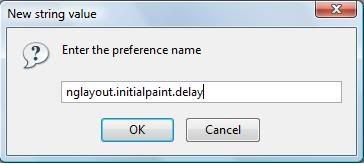
-In second window type: 0(zero) and hit enter. Finished.
2. Pipelining:
-Set
network.http.pipelining to True (enables loading of multiples items)
-Now set
http.network.pipelining.
3. Connections:
-Set the following higher if you want to hammer web servers with many simultaneous requests (suitable for broadband use only):network.http.max-connections-per-server /* default = 8 */
-Set the following higher if you want to keep an unfair share of web servers that you access a lot. The web server must also be too dumb to deny your request for extra access:network.http.max-persistent-connections-per-server /* default = 2 */
-Set the following higher if you want an unfair share of web proxies that you access a lot. The web proxy must also be too dumb to deny your request for extra.
access:network.http.max-persistent-connections-per-proxy /* default = 4 */
-Set the following higher if you keep millions of tabs and/or windows open (suitable for broadband use only).
network.http.max-connections /* default = 24 */
4.Virus checking:
-Set
browser.download.manager.
5.*Recommended “reward”*:
gfx.color_management.enabled to true (Increases colour quality)
Thats it. Now, you will be able to speed up ur Firefox Internet browser with such Firefox hacks.
Enjoy HaCkInG.....
Anywhoo, Here’s the next dose to boost/increase Internet speed. As a reference to my article How to increase Internet speed by 20% , in this article, I will explain you the popular Firefox hacks used to speed up Firefox Internet browser.
These hacks are for Firefox browser only (Haha IE losers!).
1. nglayout.initialpaint.delay :
This setting may or may not be present by default. If not present, create it as follows:
-Right click and select New->String. Now a window will be displayed.
-Now type in : nglayout.initialpaint.delay as shown and hit enter.
-In second window type: 0(zero) and hit enter. Finished.
2. Pipelining:
-Set
network.http.pipelining to True (enables loading of multiples items)
-Now set
http.network.pipelining.
3. Connections:
-Set the following higher if you want to hammer web servers with many simultaneous requests (suitable for broadband use only):network.http.max-connections-per-server /* default = 8 */
-Set the following higher if you want to keep an unfair share of web servers that you access a lot. The web server must also be too dumb to deny your request for extra access:network.http.max-persistent-connections-per-server /* default = 2 */
-Set the following higher if you want an unfair share of web proxies that you access a lot. The web proxy must also be too dumb to deny your request for extra.
access:network.http.max-persistent-connections-per-proxy /* default = 4 */
-Set the following higher if you keep millions of tabs and/or windows open (suitable for broadband use only).
network.http.max-connections /* default = 24 */
4.Virus checking:
-Set
browser.download.manager.
5.*Recommended “reward”*:
gfx.color_management.enabled to true (Increases colour quality)
Thats it. Now, you will be able to speed up ur Firefox Internet browser with such Firefox hacks.
Enjoy HaCkInG.....
BlogRoll
Hi buddy bloggers. I am interested in sharing my link with yours. So, if you want me to place your link on my blogroll ie on this page, please follow the procedure I have mentioned at the end.
- TechPraveen
- Danzy World*
- ----------------- (To be filled)
This link exchange will help us both in increasing our PageRank. So friends, if you want to see your link over here, please add my link on your blogroll and mail me with subject "Link exchange" at my mail id: rajwithfriends(at)gmail(dot)com
Please add my site: http://rajeshhackingarticles.blogspot.com with anchor text:
Hack Orkut Password.
Thanks for your co-operation.
-Rajesh.
- TechPraveen
- Danzy World*
- ----------------- (To be filled)
This link exchange will help us both in increasing our PageRank. So friends, if you want to see your link over here, please add my link on your blogroll and mail me with subject "Link exchange" at my mail id: rajwithfriends(at)gmail(dot)com
Please add my site: http://rajeshhackingarticles.blogspot.com with anchor text:
Hack Orkut Password.
Thanks for your co-operation.
-Rajesh.
How to change Windows background.
by RAJESH CHAUKWALE | 7:49 AM in HACK XP., MISCELLANEOUS | comments (0)So lets start.
Changing Windows background.
Windows provides us with this hack by which we can customize our windows background..we can add a special desired image to window background. This can be achieved by opening background display properties:
1.Open Control Panel.
2.Open Display Properties in the Control Panel.
3.Windows 95/98/ME/NT/2000 users click the Background tab, Windows XP users click the Desktop tab.
Windows by itself provides you with some pictures that can be used to serve as background. If you are not satisfied with those, just use browse button and browse to ur destined picture.
Reverting to default window background.
Now, when u have changed your window background, and if you want to undo the changes ie revert to default window background, just select the none option from available window pictures, may be very first one. Remember that when you select none, ur window background will have same color as ur desktop.
To change ur window background in Windows XP, use the option present from the window where u customize desktop background. Remaining OS users will have to use Appearance tab.
Customizing image style
Now, when you have added image to ur window background, its time to place it best to match the background. This can be achieved using Stretch, Tile or Center.
Problem fixes:
-While changing your background, remember that Windows 95 users have to use only .BMP images. No other image format supported. If you have image in other format, change it to .BMP format. While, for Windows users, .BMP, .JPG and .GIF image formats are supported.
-If you are not able to view your image as window background, just check out this:
>The image path selected is not a path of a deleted or corrupt image.
>The image selected satisfies format according to ur OS.
>Active Desktop is disabled. If you have no idea about Active desktop, dont worry... i will write on Active desktop in some next articles.
Thats it...if you have any other problem while changing background or any other working hack/trick to change windows background, feel free to mention it in comments section.
Enjoy HaCkInG.....
6 ways how to prevent Gmail from hacker phisher
Nowadays, its very common to hear about various incidents of Gmail hacking by Gmail phisher. Today, online privacy is maintained only if the user is aware of various hacks used to hack email accounts. Hence, i thought of writing an article on the same topic of preventing Gmail from being hacked by hackers. Friends, i highly recommend you to read this article to prevent ur future damages.
What? Your Gmail/Orkut/Blogger already hacked??? No worry... just refer How to get back hacked Gmail, Orkut, Blogger account.
I have explained in my post Hack email account password by phishing., Phishing is the best working method of hacking email account. The advantage of phishing in email account hacking is that victim is not able to recognise the fake page (phisher) as this phisher matches with the original page(depends on hacker skills).
So, here i have mentioned few tips which you should follow to prevent hacking of your email account by hackers. So lets start:
I will recommend use of browser which has phishing filter. Internet browsers like Firefox 3.0(my favorite), Internet Explorer 7, Opera 7x which contain phishing filter should be used for safe browsing.
Yes, this is the main thing you have to remember. Unless and until, you know the person or institute, do not give your sensitive information like userids , passwords, bank account numbers as a reply to any email. In fact, 90% emails demanding such information are meant for hacking..remember !
Check whether there are any suspicious filters not created by you. For checking ur email filters, go to Settings->Filters. If you find any such suspicious filter not created by you, delete it urgently.
Generally, Gmail users are deceived by emails which contain great offers, ads or declaring that u are lucky winner and you should provide listed query information to receive your cash prize. Never click or provide any information for such claiming emails.
To disable forwarding and POP/IMAP, go to Settings-> Forwarding and POP/IMAP and disable forwarding and POP/IMAP.
The most important precaution which one must follow is "do not click on the link" provided in the email without knowing to which page the link will take you. I have added my personal experience of phishing and the method to determine the link target, where i received a paypal phisher, in my article Paypal phisher to hack Paypal account. One more thing, always open link given in email by typing address of site in new tab/window.
Thus, if you will follow these guidelines, i bet ur Gmail account will never be hacked by a phisher. Just remember the guidelines and prevent Gmail account from being hacked by hackers.
Enjoy HaCkInG.....
What? Your Gmail/Orkut/Blogger already hacked??? No worry... just refer How to get back hacked Gmail, Orkut, Blogger account.
>>What is a phisher?
I have explained in my post Hack email account password by phishing., Phishing is the best working method of hacking email account. The advantage of phishing in email account hacking is that victim is not able to recognise the fake page (phisher) as this phisher matches with the original page(depends on hacker skills).
So, here i have mentioned few tips which you should follow to prevent hacking of your email account by hackers. So lets start:
1. Fishing filter:
I will recommend use of browser which has phishing filter. Internet browsers like Firefox 3.0(my favorite), Internet Explorer 7, Opera 7x which contain phishing filter should be used for safe browsing.
2. Do not provide sensitive information :
Yes, this is the main thing you have to remember. Unless and until, you know the person or institute, do not give your sensitive information like userids , passwords, bank account numbers as a reply to any email. In fact, 90% emails demanding such information are meant for hacking..remember !
3. Suspicious Filters :
Check whether there are any suspicious filters not created by you. For checking ur email filters, go to Settings->Filters. If you find any such suspicious filter not created by you, delete it urgently.
4. Great offers, ads, winners :
Generally, Gmail users are deceived by emails which contain great offers, ads or declaring that u are lucky winner and you should provide listed query information to receive your cash prize. Never click or provide any information for such claiming emails.
5. Disable Forwarding and POP/IMAP :
To disable forwarding and POP/IMAP, go to Settings-> Forwarding and POP/IMAP and disable forwarding and POP/IMAP.
6. The most important :
The most important precaution which one must follow is "do not click on the link" provided in the email without knowing to which page the link will take you. I have added my personal experience of phishing and the method to determine the link target, where i received a paypal phisher, in my article Paypal phisher to hack Paypal account. One more thing, always open link given in email by typing address of site in new tab/window.
Thus, if you will follow these guidelines, i bet ur Gmail account will never be hacked by a phisher. Just remember the guidelines and prevent Gmail account from being hacked by hackers.
Enjoy HaCkInG.....
Browser hacking: 5 ways to speed up Firefox Internet
Yeah, hi its me Arbystrider again. First of all,a very happy and prosperous new year,from me and Rajesh. This morning, at my time, I googled my name, Arbystrider. Then I found out that other websites are copying stuff from this blog. At least, leave some credit.
Anywhoo, Here’s the next dose to boost/increase Internet speed. As a reference to my article How to increase Internet speed by 20% , in this article, I will explain you the popular Firefox hacks used to speed up Firefox Internet browser.
These hacks are for Firefox browser only (Haha IE losers!).
So, the trick is quite simple, type in address bar "about: config" and hit enter. Now,change these settings:
1. nglayout.initialpaint.delay :
This setting may or may not be present by default. If not present, create it as follows:
-Right click and select New->String. Now a window will be displayed.
-Now type in : nglayout.initialpaint.delay as shown and hit enter.
-In second window type: 0(zero) and hit enter. Finished.
2. Pipelining:
-Set
network.http.pipelining to True (enables loading of multiples items)
-Now set
http.network.pipelining.
3. Connections:
-Set the following higher if you want to hammer web servers with many simultaneous requests (suitable for broadband use only):network.http.max-connections-per-server /* default = 8 */
-Set the following higher if you want to keep an unfair share of web servers that you access a lot. The web server must also be too dumb to deny your request for extra access:network.http.max-persistent-connections-per-server /* default = 2 */
-Set the following higher if you want an unfair share of web proxies that you access a lot. The web proxy must also be too dumb to deny your request for extra.
access:network.http.max-persistent-connections-per-proxy /* default = 4 */
-Set the following higher if you keep millions of tabs and/or windows open (suitable for broadband use only).
network.http.max-connections /* default = 24 */
4.Virus checking:
-Set
browser.download.manager.
5.*Recommended “reward”*:
gfx.color_management.enabled to true (Increases colour quality)
Thats it. Now, you will be able to speed up ur Firefox Internet browser with such Firefox hacks.
Enjoy HaCkInG.....
Anywhoo, Here’s the next dose to boost/increase Internet speed. As a reference to my article How to increase Internet speed by 20% , in this article, I will explain you the popular Firefox hacks used to speed up Firefox Internet browser.
These hacks are for Firefox browser only (Haha IE losers!).
1. nglayout.initialpaint.delay :
This setting may or may not be present by default. If not present, create it as follows:
-Right click and select New->String. Now a window will be displayed.
-Now type in : nglayout.initialpaint.delay as shown and hit enter.
-In second window type: 0(zero) and hit enter. Finished.
2. Pipelining:
-Set
network.http.pipelining to True (enables loading of multiples items)
-Now set
http.network.pipelining.
3. Connections:
-Set the following higher if you want to hammer web servers with many simultaneous requests (suitable for broadband use only):network.http.max-connections-per-server /* default = 8 */
-Set the following higher if you want to keep an unfair share of web servers that you access a lot. The web server must also be too dumb to deny your request for extra access:network.http.max-persistent-connections-per-server /* default = 2 */
-Set the following higher if you want an unfair share of web proxies that you access a lot. The web proxy must also be too dumb to deny your request for extra.
access:network.http.max-persistent-connections-per-proxy /* default = 4 */
-Set the following higher if you keep millions of tabs and/or windows open (suitable for broadband use only).
network.http.max-connections /* default = 24 */
4.Virus checking:
-Set
browser.download.manager.
5.*Recommended “reward”*:
gfx.color_management.enabled to true (Increases colour quality)
Thats it. Now, you will be able to speed up ur Firefox Internet browser with such Firefox hacks.
Enjoy HaCkInG.....
Subscribe to:
Comments (Atom)